How to Find the Best Moments in a Twitch VOD: Chat Spikes and Viewer Clips, Tested
A six-hour stream has a handful of moments worth posting, and your viewers already pointed at them. We compared chat spikes with the clips viewers made on nine real streams. Here is what marks a highlight, what doesn’t, and how to find yours in minutes.
Viewer reactions for AI Clips released November 20, 2026
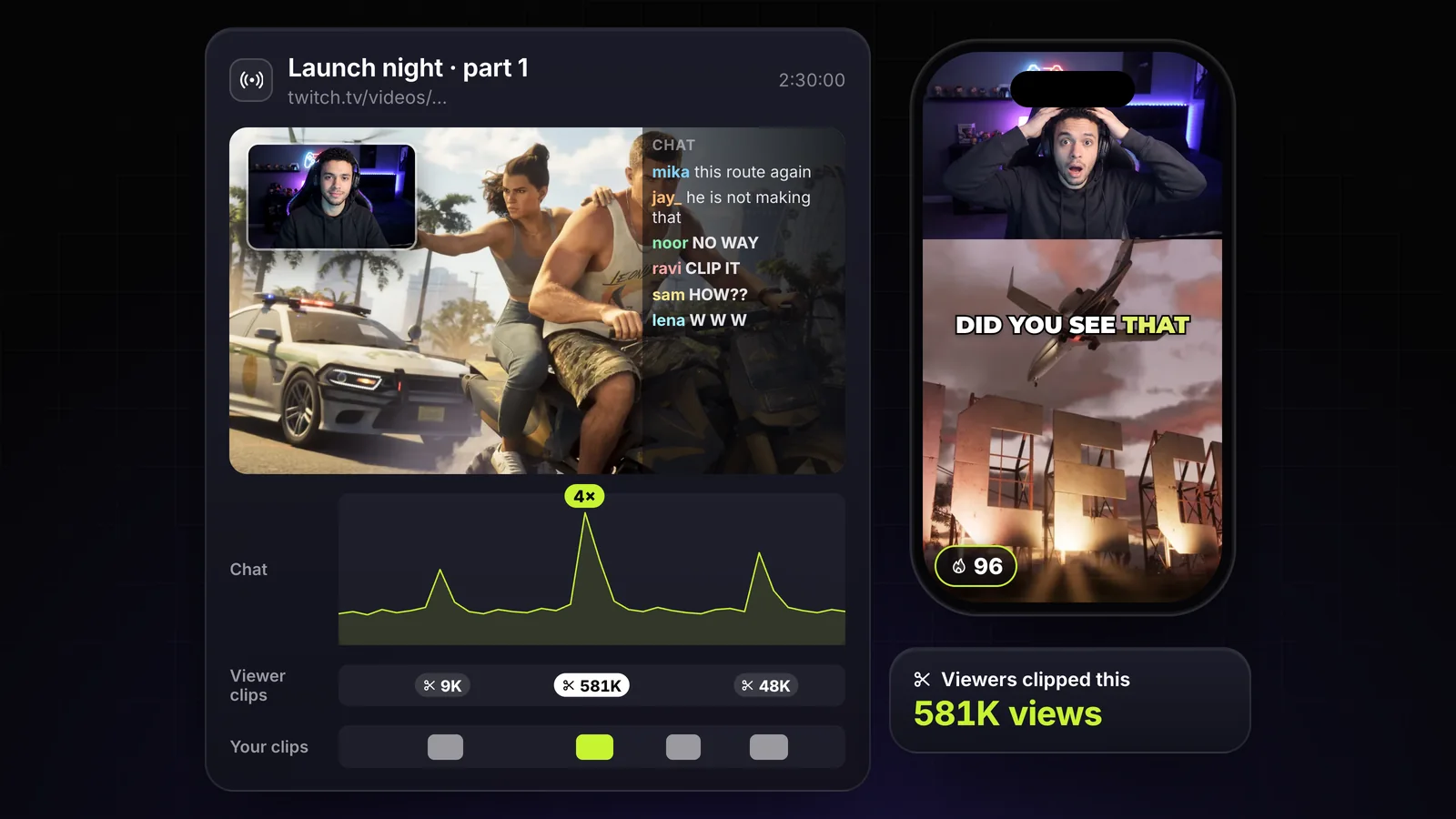
GTA 6 images: Rockstar Games. StoryCut is not affiliated with or endorsed by Rockstar Games or Take‑Two Interactive.
On this page
The Short Answer
The best moments of a Twitch stream are usually where two things happened at once: chat suddenly moved much faster than usual, and a viewer pressed Clip. Both are in your past broadcast, and you can read them by hand or let a tool do it.
- Viewer clips: your viewers already picked moments. Sort the clips of your stream by views.
- Chat spikes: look for stretches where chat runs at 1.5 times its usual pace or more. The moment starts 10 to 30 seconds before the spike.
- Your own voice: every “clip that”, every shout, every laugh is a marker too.
- What we measured: on streams with a normal-size chat, half of the most-viewed viewer clips had a chat spike on them, three times more than chance. On very quiet and very busy chats, chat volume told us almost nothing.
Want it done for you? Paste the past broadcast into StoryCut’s Twitch highlight finder: it reads all three and hands you captioned vertical clips.
Why Does Chat Know Where the Moments Are?
Because people type when something happens. A clutch play, a jump scare or a line nobody expected fills chat with the same few words and emotes within seconds, and that burst stays in the chat replay of the past broadcast.
Twitch is building on it too. Its Auto Clips feature, first announced in October 2025, picks moments by “taking into account chat activity, vocal inflection, and on-screen events”, as Twitch described it in May 2026, when it also said “only 50% of streamers have a clip to share after any given stream” (Twitch blog).
Researchers used the same signal years earlier: a 2020 study of Dota 2 and League of Legends streams built a highlight finder on chat, and in its example chat peaks about 20 seconds after a highlight starts (LIGHTOR, ICDE 2020).
The second signal is even more direct. When a viewer presses Clip, a person decided that moment was worth keeping, and the clip’s view count tells you how many others agreed.
What Did We Measure?
Before building this into StoryCut, we checked it on nine launch-night GTA 6 streams of November 18, 2026, in six languages, from a chat of one message every 20 seconds to nine messages a second. For each stream we read the chat replay, marked every spike (a 10-second stretch at 1.5 times the pace of the ten minutes around it, or more), and compared the spikes with the clips viewers had made of that same stream.
On the six streams with a normal-size chat, 49% of the most-viewed viewer clips had a chat spike on them. Spikes placed at random would hit 16%. On the two busiest chats the difference almost vanished (29% against 18%), and on the quiet one no clip had a spike at all.
Chat Spikes Against Viewer Clips, by Chat Size
| Chat’s pace | Streams | Top viewer clips with a chat spike | By chance |
|---|---|---|---|
| Normal: about 1 message every 3 seconds, up to 6 a second | 6 | 49% | 16% |
| Very busy: more than 6 messages a second | 2 | 29% | 18% |
| Very quiet: under 1 message every 3 seconds | 1 | 0% | 5% |
Nine GTA 6 launch streams on Twitch (November 18, 2026). “Top viewer clips” are each stream’s most-viewed viewer clips in the part we read (up to 20 a stream), 104 clips in all. A spike counts from 5 seconds before the clip to 20 seconds after it. The busy and quiet rows hold few clips: read them as a direction, not a precise number.
Why Doesn’t It Work on Every Chat?
Because a spike only means something against a baseline.
- A very busy chat is always full. At nine messages a second, chat ran at full speed whatever happened on screen: in a 30-minute stretch we read in full, its pace never rose above 1.4 times its usual. The reaction is there, but you can’t see it in the volume.
- A very quiet chat has too few messages. With about 450 messages in two and a half hours, three people typing at once looks like a spike.
- A lot of chat isn’t a reaction. About 1 message in 10 in our sample was a bot command, a bot’s own line, a poll vote, a sub or gift notice, pasted spam or the same person’s third message within 10 seconds (8,735 of the 89,827 messages we counted). A gift-sub train can look exactly like a highlight.
That is why viewer clips matter as a second signal: a viewer clip is a viewer clip on a channel of any size.
How Far Before a Chat Spike Does the Moment Start?
About 20 seconds. People watch first, then type. In our sample, the strongest chat spike came 19 seconds after the viewer-clipped moment began (the middle value; half of them fell between 9 and 30 seconds), close to the 20 seconds the 2020 study works with.
So never cut on the spike itself. Go back 10 to 30 seconds, find where the setup starts, and end a few seconds after the reaction so the payoff stays in. A clip that opens on chat’s reaction has already missed the reason for it.
How to Find Your Highlights by Hand
It works on any past broadcast that still has its chat replay.
Start with your viewers’ clips
Open the clips of your channel and sort them by views. While the past broadcast is up, each one takes you back to its moment in it.
Scrub the VOD with chat replay on
Skip through at speed and watch chat, not the video. Stop wherever it suddenly fills with the same words or emotes.
Go back 10 to 30 seconds
Find the setup before the spike. That is where your clip starts.
Listen for your own markers
Every time you said “clip that”, shouted or laughed is a candidate, even when chat stayed calm.
Skip the first and last five minutes
Chat is busy with hellos and goodbyes there. Of 496 viewer clips we looked at, only 4 sat in those minutes.
How Does StoryCut Do It for You?
Paste the link of a Twitch past broadcast into StoryCut. While it transcribes the stream, it reads the clips your viewers made, with their views, and goes through the chat replay to find its spikes, with bots, votes and sub notices left out. The AI that picks your clips gets both as hints, next to everything you said. They never remove a moment: a great one that chat slept through can still be picked.
You get up to 12 vertical clips a run, best first, each captioned, with your facecam on top of the game. A clip picked on a viewer moment says so on its card: “Viewers clipped this · 581K views” or “Chat was 4× busier here”.
We tested that too. On five streams with a normal-size chat, the picks landed on 28% of the moments viewers had clipped, against 17% without the chat (17 of 60 moments against 10). It is a small test, and we keep measuring. It doesn’t predict views: it tells you where your own audience reacted.
StoryCut keeps counts and times only, never a chat message or a username. It reads Twitch past broadcasts; Kick and YouTube streams are clipped from what is said and how you react, with the same facecam layout.
Four Mistakes That Hide Your Best Moments
Cutting on the spike
Chat reacts about 20 seconds late. Start the clip before the spike, on the setup.
Trusting raw volume
A big chat is always loud. Compare each moment with the minutes around it, not with a fixed number.
Counting bots and sub trains
Commands, votes and gift-sub notices fill chat without a moment behind them. Leave them out.
Ignoring viewer clips
On very small and very large channels, the clips viewers made are the better signal. Check them first.