An Elgato Prompter Alternative With No Hardware to Buy
Elgato’s Prompter puts your script in front of the lens for $299.99, and the Prompter XL for $599.99. If you record videos rather than go live, there is a cheaper route: read from a teleprompter in your browser, then let AI point your eyes back at the lens. Here is how the two compare, and when the hardware is worth it. Prices checked on elgato.com on October 9, 2026. StoryCut is our product and isn’t affiliated with Elgato.
- 1 free video up to 4 min
- Free browser teleprompter
- No hardware
Elgato Prompter alternative: the short answer
- Elgato’s price
- Prompter is $299.99, with a 9-inch built-in screen. Prompter XL is $599.99, with a 15.6-inch screen for bigger cameras and longer distances (Elgato US store).
- What the hardware does
- It shows your script on glass in front of the lens, so you read while looking almost straight into the camera. It works live too, on calls and streams.
- The no-hardware route
- Read from StoryCut’s free browser teleprompter, kept in a narrow strip right under your webcam. Record as usual, then correct the gaze with AI eye contact.
- What AI correction covers
- It fully redirects your gaze up to about 20° off the lens and fades out between 20° and 30°. Reading from a narrow strip next to the camera stays well inside that.
- Cost
- The teleprompter is free. Eye contact: 1 free video up to 4 minutes, then 5 videos for $9 one-time, or Pro with 10 a month at $14/mo billed yearly.
Elgato Prompter vs a browser teleprompter plus AI eye contact
| What matters | Elgato Prompter | Elgato Prompter XL | Free teleprompter + StoryCut eye contact |
|---|---|---|---|
| Price | $299.99 | $599.99 | Teleprompter free; eye contact 1 free video, then $9 for 5 |
| Screen | 9-inch built-in display | 15.6-inch removable display | The screen you already have |
| Where your eyes are | On the glass, in front of the lens | On the glass, in front of the lens | Next to the lens, corrected afterwards |
| Live calls and streams | Yes | Yes | Norecorded video only |
| Recorded videos | Yes | Yes | Yes |
| Setup | Several mounting options, for webcams to phones and cameras | Mounts on a tripod or C-stand, for larger cameras and lenses | Nothing to mount |
| Scrolling | Voice Sync follows your voice (needs an NVIDIA RTX 2060 or newer, or Apple Silicon) | Voice Sync follows your voice | You set the speed in words per minute |
| Software | Camera Hub, free on PC and Mac | Camera Hub, free on PC and Mac | Runs in any browser, no download |
Checked on October 9, 2026 from each product’s public pages. Sources: Elgato Prompter, Elgato Prompter XL, StoryCut free teleprompter, StoryCut pricing.
How the no-hardware setup works
Open the free teleprompter in your browser, paste your script and set the text size and speed. Shrink the window to a narrow strip of 3 to 5 words and drag it to the edge of the screen closest to your webcam. Sit back as far as you can still read comfortably: the further you sit and the narrower the line, the smaller each eye movement.
Record as usual, with your webcam app, OBS, Zoom or a camera. Then upload the take to StoryCut. NVIDIA’s Maxine Eye Contact model points your eyes at the lens in every frame and keeps your blinks, resolution, frame rate and audio as recorded.
How It Works
Read, record, fix: the three steps
No hardware and nothing to install.
- 01
Read from the free teleprompter
Paste your script, pick a speed and a text size, and place the window right under your camera. Mirror mode is there if you later add teleprompter glass.
- 02
Record and upload the take
Record with any app or camera, then upload the file to StoryCut: MP4, MOV, AVI, MKV or WebM.
- 03
Download it looking at the lens
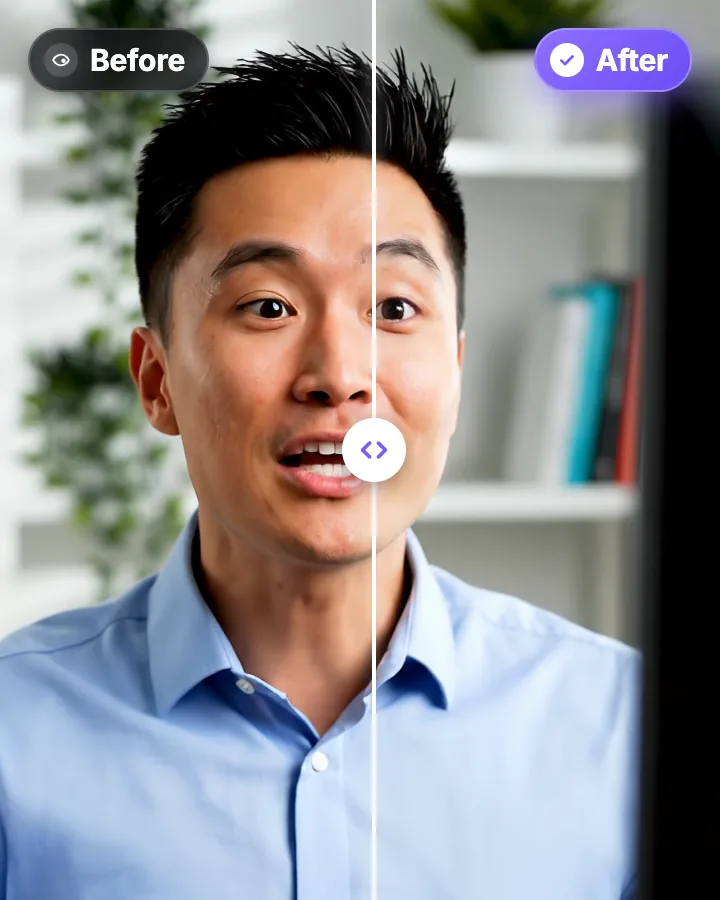
The AI redirects your gaze in every frame. Compare before and after, then download the MP4.
When the Elgato Prompter is worth it
Buy the hardware if you are live a lot: webinars, sales calls, streams or remote interviews. AI correction only works on recordings, and Elgato’s glass puts the text over the lens while you talk. It is also the better choice if you read long scripts from far away. AI correction is full up to about 20° and fades out by 30°, so a big monitor far to the side of the camera can go past what it fixes.
For recorded videos, the software route costs less and takes no desk space. You can also combine them: the Prompter for live work, AI correction for the takes you recorded without it.
Other ways to read a script on camera
Beam-splitter teleprompters that use a phone or tablet as the screen are sold by several brands. They put the text on glass like the Elgato, and they suit a camera on a tripod better than a webcam on a monitor.
A teleprompter app on a phone, tablet or laptop, with no glass, shows the text next to the lens rather than on it. That is the same situation as the browser teleprompter, and the same fix applies: keep the text narrow and close to the camera, then correct what is left with AI.
Reading on camera: tools and guides
 Descript eye contact: price and limitsRead
 Captions eye contact on web and AndroidReadFix eye contact in Premiere Pro footageRead
 CapCut eye contact on PC, Mac and webReadFix eye contact in DaVinci Resolve footageReadFix eye contact in Final Cut Pro and iMovieReadDoes Canva have eye contact correction?ReadLoom eye contactReadBIGVU pricing and AI eye contactReadRiverside eye contact: what it can’t fixReadVEED eye contact: price and limitsReadKapwing eye contact: credits and cost per minuteRead
 Submagic pricing and AI eye contactRead
FAQ
Frequently Asked Questions
Skip the Hardware, Keep the Eye Contact
Upload your video. Get back a scroll-stopper with viral captions, cinematic transitions, auto zoom, and clean audio. The same tools top creators use to explode views.
Read from the free teleprompter, record, then fix the gaze in your browser. 1 free video, no credit card.
- Join 10,000+ creators
- No credit card required

You Might Also Like
Teleprompter Eye Contact: Read a Script and Still Look at the Lens
A teleprompter puts your script in front of the lens, yet viewers can still see your eyes scan each line. Here is how wide to set the text, how far to sit, and what to do when the take is already recorded.
AI Eye Contact and Gaze Correction for Recorded Videos
Read a script, checked your notes or watched yourself on screen? Upload the video and the AI points your gaze back at the lens in every frame, keeping your resolution, frame rate and audio. Your first video is free.
NVIDIA Eye Contact for Videos You Already Recorded
NVIDIA Broadcast corrects your gaze live, on a Windows PC with an RTX graphics card. If you have a recorded video, a Mac or no RTX GPU, StoryCut runs NVIDIA’s Maxine Eye Contact model on the file, in its cloud. StoryCut is not affiliated with or endorsed by NVIDIA.

AI video editor for creators who want viral content without the editing grind.
Features
All FeaturesAI CaptionsHormozi CaptionsMrBeast CaptionsAdd Subtitles to VideoSubtitle GeneratorAI Video EditorAI Clip GeneratorYouTube to ShortsEye Contact FixMagic ZoomTransitionsClean AudioAI MusicSound EffectsAI Auto EditRemove SilenceAI ThumbnailsBrand KitsCommunity StylesAI Video TranslatorFree Tools
Video Hook GeneratorTikTok CaptionsInstagram CaptionsYouTube TitlesTikTok HashtagsVideo Script GeneratorAI Video IdeasContent CalendarTikTok TranscriptVideo to TextFree SRT GeneratorSubtitle TranslatorFree TeleprompterWords to MinutesSRT to VTT ConverterTikTok Safe ZoneFree Sound EffectsAll 40 Tools →Use Cases
TikTok CreatorsYouTube ShortsInstagram ReelsPodcastersClippersAgencies & TeamsLinkedIn VideosTeleprompter Eye ContactPremiere Pro Eye ContactDaVinci Resolve Eye ContactFinal Cut Pro Eye ContactLoom Eye Contact