Best AI Eye Contact Correction Software in 2026, Compared
Which tools fix eye contact in a video you already recorded, which only work on a live webcam, and what each one costs. Checked on each vendor’s own pages on October 8, 2026. StoryCut publishes this page and is one of the tools listed.
- 1 free video up to 4 min
- No credit card
- No watermark
Eye contact correction software: the short answer
- Short answer
- For a video you already recorded, you need a tool that processes files: StoryCut, Descript, VEED, Kapwing, Submagic, Captions, CaptionX, BIGVU or Filmora. NVIDIA Broadcast, Windows Studio Effects and FaceTime only correct a live camera and can’t open a file. Premiere Pro, DaVinci Resolve, Final Cut Pro, iMovie, Canva and Loom have no eye contact built in.
- Cheapest per minute
- StoryCut’s one-time pack: $9 for 5 videos of up to 10 minutes, about $0.18 a minute. CaptionX works out to about $0.39 to $0.47 a minute, Kapwing to about $0.48 to $0.72.
- Free tries
- StoryCut: 1 video up to 4 minutes, no watermark. CaptionX: 2 clips up to 2 minutes. VEED: one use per account. Descript: limited, on the free plan’s 100 one-time AI credits. The live tools are free but don’t take files.
- Riverside’s limit
- Riverside’s eye contact works only on tracks recorded on Riverside in a web browser. Its help center says it can’t be applied to external uploads or screen share tracks.
- Same model, different products
- StoryCut and CaptionX both run NVIDIA’s Maxine Eye Contact model. NVIDIA itself offers Maxine Eye Contact to developers, as an API and a container on build.nvidia.com.
- Disclosure
- StoryCut publishes this page and is one of the tools compared. Competitor facts come from each vendor’s pricing and help pages, linked under the table. Where a tool fits better, we say so.
16 eye contact tools compared
| Tool | Recorded files or live | Platform | Cheapest plan with eye contact | Length limit | Free option | Price per minute |
|---|---|---|---|---|---|---|
| StoryCut | Recorded files (upload) | Any browser: Mac, Windows, Chromebook, phone | $9 one-time for 5 videos, or Pro $14/mo yearly (10/mo) | 4 min free try, 10 min pack and Pro, 30 min Business | Yes1 video, no watermark | About $0.18 (pack) |
| CaptionX | Recorded clips, in Premiere Pro or its web tool | Premiere Pro plugin (Windows, Mac) and a browser tool | $13.95/mo or $139/yr for 30 min a month | 30 min a month | Yes2 clips up to 2 min | About $0.39 to $0.47 |
| Kapwing | Recorded files, in its editor | Browser | Pro $24/mo, or $16/mo yearly | About 33 min a month (30 credits per minute) | NoPro required | About $0.48 to $0.72 |
| Descript | Recorded files, in its editor | Mac and Windows app, browser | Hobbyist $24/mo, or $16/mo yearly (AI credits) | Not published | Limited(100 one-time AI credits, 720p export) | Not computable (credits) |
| VEED | Recorded files, in its editor | Browser | Creator $20/mo, or $10/mo yearly | Not published | Yesone use per account | Not computable |
| Submagic | Recorded files, in its editor | Browser | Pro $39/mo, or $23/mo yearly | 5 min per video | Not listed | Not computable |
| Captions | Recorded files, in its apps | iPhone, Android, legacy desktop app; not Captions on Web | Lite $4.99/mo (Android only) or Basic $9.99/mo | 10 min (iPhone editor) | Nonot on the free plan | Not computable |
| BIGVU | Recorded takes and imported files, in its app | iPhone and Android apps, web | AI Pro $39/mo, or $229/yr | 59 min recordings | Nonot on the free plan | Not computable |
| Filmora | Recorded clips, in its editor | Desktop editor | See Filmora’s pricing | 3 min per clip (per Filmora’s help) | — | — |
| Riverside | Only tracks recorded in Riverside in a web browser; not uploads or screen share | Riverside editor (computer browser, Mac app) | Pro $29/mo, or $24/mo yearly | Not published | NoPro and up | Not computable |
| CapCut | Recorded clips, in its editor; availability varies by region and app version | Phone app; desktop app (Video > Basic) in some regions | Free, per CapCut | Not published | Yesper CapCut | — |
| HeyGen | Only your own AI avatar, not uploaded videos | Browser | — | — | — | — |
| NVIDIA Broadcast | Live webcam only | Windows with an NVIDIA RTX 2060 or better | Free app | Live only | Yesfree | n/a |
| Windows Studio Effects | Live camera only (calls) | Copilot+ PCs; Teleprompter mode on Snapdragon | Built into Windows | Live only | Yesfree | n/a |
| FaceTime Eye Contact | Live FaceTime calls only | iPhone | Built into iOS | Live only | Yesfree | n/a |
| NVIDIA Maxine (developers) | Files, through code | API and container (NIM) on build.nvidia.com | Developer product | — | — | — |
Checked on October 8, 2026 from each product’s public pages. Sources: StoryCut pricing, CaptionX pricing, CaptionX eye contact for Premiere Pro, Kapwing pricing, Kapwing eye contact, Descript: Eye Contact, Descript pricing, VEED pricing, VEED: eye contact correction, Submagic pricing, Captions plans, Captions feature availability, Filmora AI Eye Contact guide, CapCut AI eye contact, CaptionX online eye contact tool, BIGVU pricing, BIGVU tutorial: AI Eye-Contact Correction, Riverside: Fix gaze for natural eye contact, Riverside pricing, Kapwing: how credits work, NVIDIA Broadcast, Windows Studio Effects, NVIDIA Maxine Eye Contact.
How we compared
We listed every tool we could find that corrects gaze in video and checked each one on its own pricing and help pages on October 8, 2026. Prices and plans in the StoryCut, Kapwing, Descript, VEED, Submagic, Captions, Riverside, CapCut, CaptionX and BIGVU rows, and the NVIDIA Broadcast and Windows Studio Effects requirements, were re-checked on October 9, 2026. The first column that matters is the second one: a tool that only works on a live camera can’t fix a recording, however good it is. A dash means the vendor doesn’t publish that detail or we couldn’t verify it. Prices are in US dollars, before tax.
Not in the table: Opus Clip, which has no eye contact feature. We also looked for eye contact in Clipchamp and Camtasia and found none in their own documentation.
What “price per minute” means here
Price per minute is the cheapest paid price divided by the most footage it covers. StoryCut’s pack is $9 for 5 videos of up to 10 minutes, so about $0.18 a minute if every video runs the full 10 minutes. Short videos still use a whole credit each, so count $1.80 a video if yours are 1 or 2 minutes long.
CaptionX’s Pro plan covers 30 minutes a month: $13.95 a month is about $0.47 a minute, and $139 a year about $0.39. Kapwing Pro includes 1,000 credits a month and charges 30 credits per minute of eye contact, about 33 minutes: $16 to $24 a month is $0.48 to $0.72 a minute. Descript, Captions, VEED and Submagic don’t publish how much eye contact a plan covers, so we can’t compute a fair figure for them.
The best eye contact tool for each job
A recorded video you just want fixed: StoryCut
1 free video, then $9 for 5 with no subscription, the lowest price per minute we could compute. Runs in any browser and keeps your resolution and audio. It is our product.
Editing in Premiere Pro: CaptionX
A Premiere plugin that runs NVIDIA’s Maxine model and drops the corrected clip on the track above the original, so you never leave the timeline.
Editing by transcript: Descript
Eye Contact is an effect inside Descript’s editor: a limited try on the free plan, then from Hobbyist, paid with AI credits. It needs one clear face and constant frame rate footage.
Editing on your phone: Captions
In the iPhone app on Basic ($9.99/mo) or the Android app on Lite ($4.99/mo). It isn’t in Captions on Web.
A team already in a browser editor: VEED or Kapwing
Eye contact comes with VEED Creator or Kapwing Pro. Worth it if you already edit there; Kapwing publishes its cost (30 credits a minute).
Short captioned clips: Submagic
Eye contact on Pro next to its caption templates, for videos up to 5 minutes. StoryCut Pro also pairs captions and eye contact, for videos up to 10 minutes.
Live calls and streams: NVIDIA Broadcast or Studio Effects
Free and real time, but they only change your live camera. Broadcast needs an RTX 2060 or better on Windows; Studio Effects a Copilot+ PC.
Building your own product: NVIDIA Maxine
NVIDIA’s developer API and container for eye contact, if you want to process video inside your own app.
The best eye contact correction app for your device
On an iPhone, the Captions app has AI Eye Contact on its Basic plan, and CapCut’s phone app has an eye contact switch where it is available. On Android, Captions offers it on Lite, and CapCut’s app again depends on your region and app version. On a Mac or a Windows PC, Descript’s desktop app and Filmora have it built into their editors. NVIDIA Broadcast and Windows Studio Effects are free apps too, but only for a live camera.
If you don’t want to install anything, use a web app. StoryCut runs in Safari and Chrome on phones, Macs, PCs and Chromebooks: upload the video, download it corrected, and keep editing in whatever app you like. Your first video is free, with no watermark.
Go deeper on eye contact
 Descript eye contact: price and limitsRead
 Captions eye contact on web and AndroidReadFix eye contact in Premiere Pro footageRead
 CapCut eye contact on PC, Mac and webReadFix eye contact in DaVinci Resolve footageReadFix eye contact in Final Cut Pro and iMovieReadDoes Canva have eye contact correction?ReadLoom eye contactReadBIGVU pricing and AI eye contactReadRiverside eye contact: what it can’t fixReadVEED eye contact: price and limitsReadKapwing eye contact: credits and cost per minuteRead
 Submagic pricing and AI eye contactReadElgato Prompter alternativeRead
FAQ
Frequently Asked Questions
Try Eye Contact Correction on Your Own Video
Upload your video. Get back a scroll-stopper with viral captions, cinematic transitions, auto zoom, and clean audio. The same tools top creators use to explode views.
Upload a recording in any browser and compare before and after. 1 free video up to 4 minutes, no credit card, no watermark.
- Join 10,000+ creators
- No credit card required

You Might Also Like
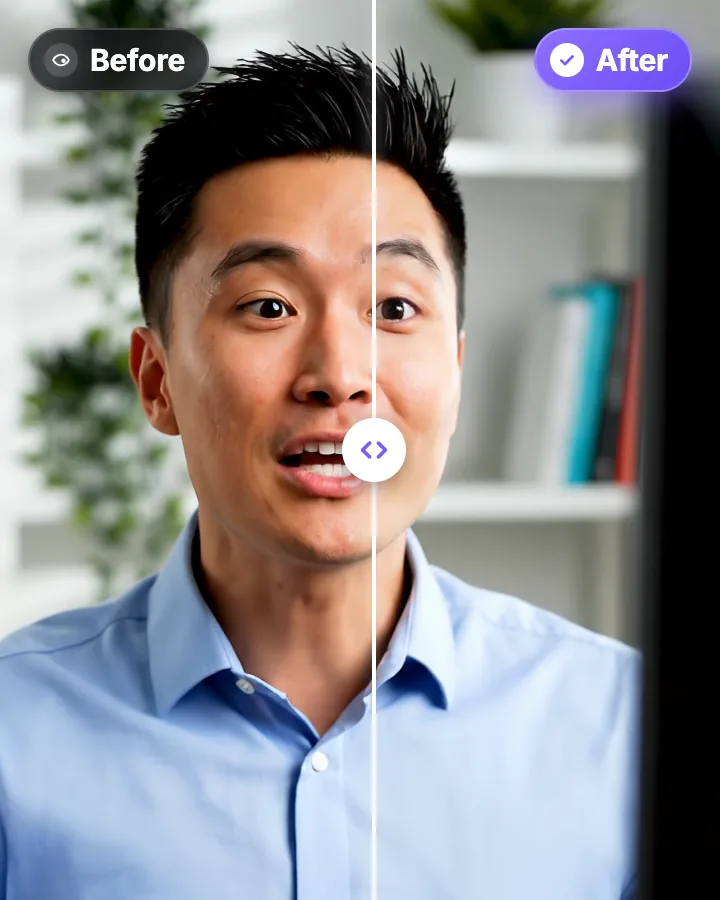
AI Eye Contact and Gaze Correction for Recorded Videos
Read a script, checked your notes or watched yourself on screen? Upload the video and the AI points your gaze back at the lens in every frame, keeping your resolution, frame rate and audio. Your first video is free.
Descript Eye Contact: Price, Limits and a Cheaper Alternative
Descript’s Eye Contact is an effect inside its editor: limited on the free plan, full from Hobbyist, paid with AI credits. Here is what it needs, why it sometimes doesn’t work, and how to correct eye contact without a subscription. Checked on Descript’s pages on October 9, 2026. StoryCut is our product.
Captions AI Eye Contact: Where It Works, and How to Get It in a Browser
Captions (by Mirage) offers AI Eye Contact in its apps, but not in Captions on Web. If you edit in a browser, on a Chromebook or on a work computer where you can’t install apps, here is the no-app route. Checked on Captions’ help center on October 8, 2026. StoryCut is our product.

AI video editor for creators who want viral content without the editing grind.
Features
All FeaturesAI CaptionsHormozi CaptionsMrBeast CaptionsAdd Subtitles to VideoSubtitle GeneratorAI Video EditorAI Clip GeneratorYouTube to ShortsEye Contact FixMagic ZoomTransitionsClean AudioAI MusicSound EffectsAI Auto EditRemove SilenceAI ThumbnailsBrand KitsCommunity StylesAI Video TranslatorFree Tools
Video Hook GeneratorTikTok CaptionsInstagram CaptionsYouTube TitlesTikTok HashtagsVideo Script GeneratorAI Video IdeasContent CalendarTikTok TranscriptVideo to TextFree SRT GeneratorSubtitle TranslatorFree TeleprompterWords to MinutesSRT to VTT ConverterTikTok Safe ZoneFree Sound EffectsAll 40 Tools →Use Cases
TikTok CreatorsYouTube ShortsInstagram ReelsPodcastersClippersAgencies & TeamsLinkedIn VideosTeleprompter Eye ContactPremiere Pro Eye ContactDaVinci Resolve Eye ContactFinal Cut Pro Eye ContactLoom Eye Contact