 VS
VS
CapCut Alternatives in 2026: 7 Editors Compared
CapCut is still a free, full editor on every platform, and it is still in US app stores. If the 2026 price rise, the Pro prompts or the content licence in its terms are why you’re looking, here is how seven alternatives compare. Prices checked on each tool’s website on October 3, 2026. StoryCut is our product.
- Free plan, no credit card
- Free exports are 720p with a watermark






CapCut alternatives: the short answer
- Short answer
- Pick by why you’re leaving. To keep a free timeline editor with 1080p exports and no watermark: Clipchamp (web and Windows). To stop editing by hand and get captions, sound effects and zooms placed for you: StoryCut (web). For an AI editor on iPhone: Captions. For editing by transcript on desktop: Descript. For a browser editor with subtitles and dubbing: VEED.
- CapCut’s prices
- The editor is free, but Pro templates and effects add a watermark and 4K/60fps export is locked. Pro is $19.99/mo or $179.99/yr (about $15/mo), with 1,200 AI credits a month and 1 TB of cloud storage. The iOS app also lists a Standard plan at $9.99/mo. CapCut says prices vary by region, platform and promotion.
- Is CapCut banned in the US?
- No. It went dark on January 18, 2025, restored service on January 21 and returned to the App Store and Google Play on February 13, 2025. On October 3, 2026 it is in the US App Store (last updated September 21, 2026).
- What CapCut does well
- A complete multi-track editor on iOS, Android, Windows, Mac and the web, a huge template and effects library, AI sound effects and eye contact in the mobile app, and 4.6 stars from over 1.1 million App Store ratings.
- StoryCut
- Not a timeline editor: upload a talking video and captions start on their own, in 49 languages and 26 styles. Pro ($14/mo billed yearly) adds sound effects placed on key words, magic zoom, clean audio, AI music and voice dubbing. Web only, with no phone app.
Why are people leaving CapCut?
Mostly because of price and paywalls, not the editor. In early 2026 CapCut Pro went from about $77.99 a year to $179.99 a year, and Newsweek reported that existing yearly subscribers moved to the new price from February 20, 2026. Pro is $19.99 a month, and CapCut’s help center says prices vary by region, device and promotion, so two people can see different prices. More of the app now sits behind Pro: on the free plan, Pro templates and effects add a watermark, and 4K and 60fps export are locked. Some App Store reviews put it bluntly: "STOP MAKING EVERYTHING PRO!" The second reason is the terms. In June 2025 a change to CapCut’s terms drew criticism over a broad licence to user content. The current global terms (updated April 15, 2026) say "We don’t own your User Content", but uploading still grants CapCut a "non-exclusive, royalty-free, transferable, sub-licensable, perpetual and worldwide license" to use it; US users are pointed to separate US terms. The third reason is time: CapCut gives you every tool, but you build each edit yourself on a timeline. In fairness, CapCut’s strengths are real, and no single tool below matches all of them: a free editor on every platform, a giant template library and 4.6 stars from over 1.1 million App Store ratings.
Is CapCut still banned in the USA?
No. CapCut went dark in the US on January 18, 2025, together with TikTok and other ByteDance apps, when the US divest-or-ban law took effect. Service came back on January 21, and Apple and Google returned it to their US stores on February 13, 2025. On January 23, 2026, the new TikTok USDS Joint Venture announced that its safeguards for US user data "will also cover CapCut". As of October 3, 2026, CapCut is available in the US App Store, last updated on September 21, 2026, with 4.6 stars from over 1.1 million ratings. So if you are switching in 2026, the reasons that hold up are price, paywalls, the terms and editing time, not availability.
CapCut vs 7 alternatives at a glance
| Tool | Paid plan | Free plan | How you edit | Works on | Auto sound effects | Eye contact |
|---|---|---|---|---|---|---|
| CapCut | Pro: $179.99/yr or $19.99/mo (varies) | Yesfree editor; Pro assets add a watermark | Multi-track timeline, templates | iOS, Android, Windows, Mac, web | AI sound effects tool (mobile) | Yesmobile app |
| StoryCut | Starter: $7/mo yearly, $9/mo monthly | Yes720p, watermark, videos up to 4 min | Auto captions, one-click effects | Web (desktop and mobile browsers) | YesAI-placed on key words (Pro) | YesPro (10/mo) and Business, 1 free try |
| Clipchamp | Premium via Microsoft 365, from $9.99/mo | Yes1080p, no watermark | Timeline, templates | Web (Edge, Chrome), Windows app | Not listed (stock sound library) | Not listed |
| Captions | Basic: $9.99/mo (Max $24.99/mo) | Yes60–200 lifetime credits | AI Edit plus a manual editor | iOS, macOS, web; Android (Lite) | Prompt-made AI Sounds (Max) | YesiOS app (not the new web app) |
| VEED | Creator: $9.67/mo yearly, $20/mo monthly | Yes720p, watermark | Timeline in the browser | Web, iOS | Nomanual | YesCreator or Pro (pages differ) |
| Descript | Hobbyist: $16/mo yearly, $24/mo monthly | Yes60 min/month, 720p, watermark | Edit the transcript like a document | Mac, Windows, web (no mobile) | Nolibrary + AI generation | Yeslimited on Free, full from Hobbyist (credits) |
| Submagic | Starter: $12/mo yearly, $19/mo monthly | Trial: 3 short videos, watermark | Template captions, AI Auto Edit | Web (no mobile app) | Nomanual library | YesPro and up |
| Kapwing | Pro: $16/mo yearly, $24/mo monthly | Yes10 lifetime credits, 720p, watermark | Timeline in the browser | Web | Nolibrary + text-to-SFX | Yes30 credits per minute |
Checked on October 3, 2026 from each product’s public pages. Sources: CapCut Standard vs Pro, CapCut subscription pricing, CapCut Pro features, CapCut AI sound effects, CapCut AI eye contact, CapCut on the App Store, CapCut terms of service, CapCut US outage timeline, TikTok USDS Joint Venture, DPReview on the 2025 terms change, Clipchamp pricing, Clipchamp iOS app retirement, Microsoft 365 plans, Captions pricing, Captions feature availability, VEED pricing, Descript pricing, Submagic pricing, Kapwing pricing, Kapwing credits.
The alternatives, one by one
StoryCut
Best for: captions and effects without timeline work
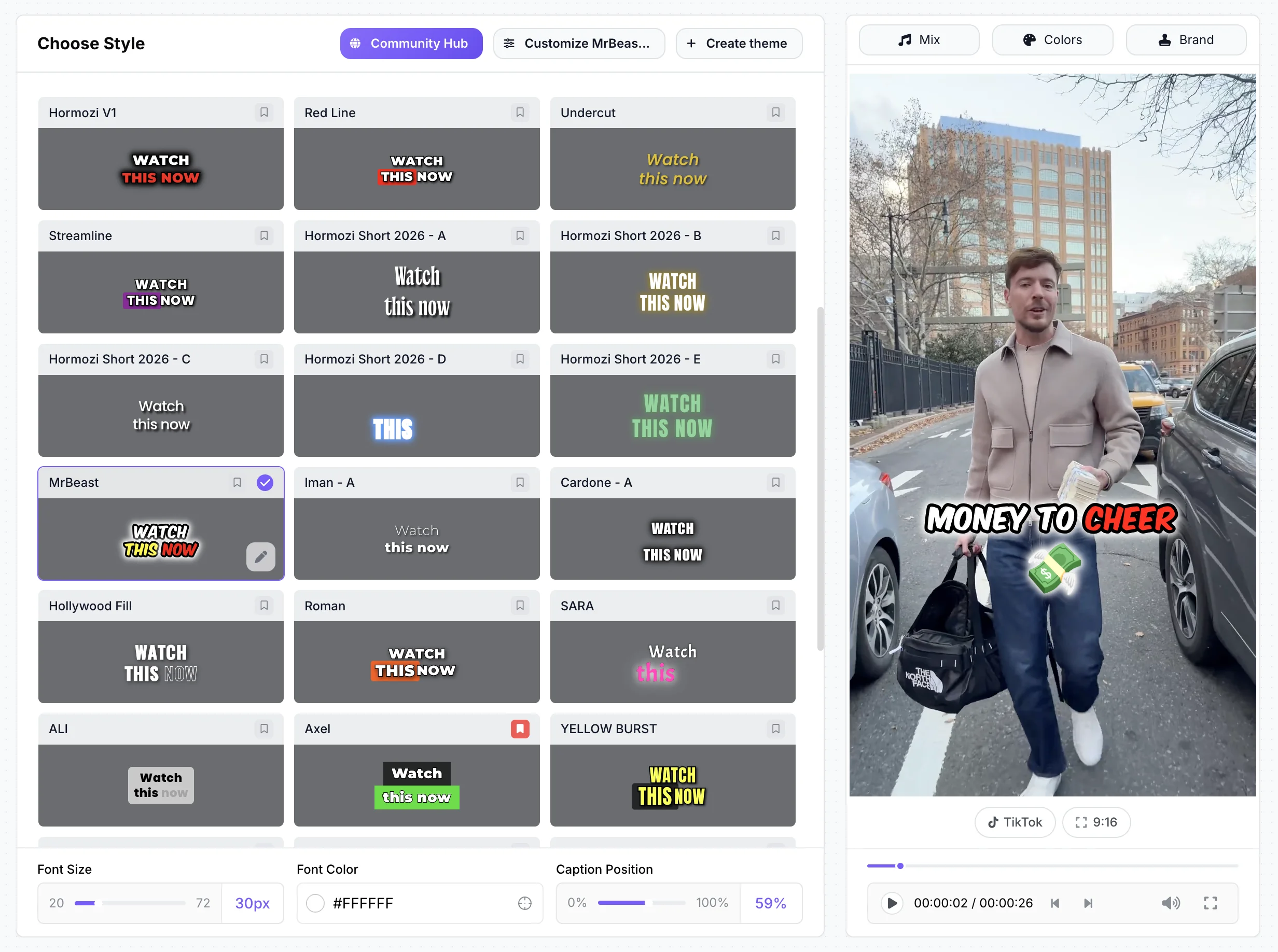
StoryCut isn’t a timeline editor, and that is the point. Upload a talking video and captions start on their own when the upload finishes, in 49 languages and 26 styles, including 6 Hormozi-style presets and a MrBeast-style one. On every plan, the AI can place transitions from a set of 51 in one click. Pro ($14/mo billed yearly) adds sound effects on key words, magic zoom, silence removal, clean audio, AI music, voice dubbing in 33 languages and eye contact correction (10 videos a month), and every account can try eye contact once for free. It runs in desktop and mobile browsers. There is no phone or desktop app, no multi-clip timeline and no template marketplace.
Clipchamp
Best for: a free timeline editor with 1080p and no watermark
Microsoft’s editor is the closest free swap for CapCut on a computer: a timeline editor in Edge or Chrome and a Windows app (built into Windows 11), with free 1080p exports, no watermark, auto captions in 80+ languages, silence removal, noise suppression and text-to-speech. 4K and premium stock come with Microsoft 365 Personal ($9.99/mo) or Family ($12.99/mo). It is not a phone editor: the iOS app was retired on June 9, 2026, there is no Android app, and the web editor isn’t optimized for tablets.

Captions
Best for: an AI editor on iPhone
Captions (now by Mirage) is the strongest phone-first option here: a 4.7-star iPhone app (over 38,000 App Store ratings) with AI Edit, eye contact, dubbing in 31 languages plus Lipdub, and AI avatars. Basic costs $9.99/mo and Max $24.99/mo. AI features use credits that are spent even if you don’t export, eye contact isn’t in the new web app, and Android only gets Captions Lite.
VEED
Best for: a timeline editor in the browser
VEED is a general editor in the browser, plus an iPhone app, with auto subtitles (unlimited on paid plans within a fair-use cap), eye contact, AI B-roll and, from Pro, voice dubbing in 29 languages. Creator costs $9.67/mo billed yearly ($20 monthly) and exports 1080p with no length limit. AI features run on monthly credits, and the free plan exports 720p with a watermark.

Descript
Best for: editing longer videos by transcript
Descript edits video by editing the transcript, in a desktop app for Mac and Windows or on the web. Hobbyist ($16/mo billed yearly) includes eye contact, filler-word removal and AI dubbing in 30 languages, with AI tools paid in credits. There is no mobile app, and mobile browsers aren’t supported.

Submagic
Best for: fast template captions on short clips
Submagic adds animated caption templates (including Hormozi 1–5 themes), B-roll and transitions in a few clicks, with eye contact, auto zoom and clean audio from Pro ($23/mo billed yearly). Starter ($12/mo billed yearly) caps videos at 2 minutes and 15 a month. Sound effects are added by hand, and its help center says it doesn’t give refunds.
Kapwing
Best for: long exports and team editing in the browser
Kapwing is a collaborative browser editor. Pro ($16/mo billed yearly) exports 4K videos up to 120 minutes and includes 1,000 credits a month for AI tools such as subtitles, dubbing in 40+ languages and eye contact (30 credits per minute). The free plan has 10 credits for the life of the account and exports 720p with a watermark, and Kapwing offers no trial and no refunds.
Upload one talking video and watch the captions appear
Pricing: StoryCut vs CapCut
StoryCut- 3 videos at a time
- 720p export with watermark
- Videos up to 4 min
- AI captions, caption styles and transitions
- 1 long video per month into AI clips
- 20 videos at a time
- 1080p export, no watermark
- Videos up to 7 min
- AI captions, caption styles and transitions
- 10 long videos per month into AI clips
- 50 videos at a time
- 2K export, no watermark
- Videos up to 10 min
- AI eye contact (10 videos/month), auto sound effects, magic zoom, silence removal, clean audio, AI music, dubbing
- 50 long videos per month into AI clips
- 100 videos at a time
- 4K 60fps export, no watermark
- Videos up to 30 min
- Everything in Pro + unlimited AI eye contact + priority rendering
- 5 team members
- 100 long videos per month into AI clips
CapCut- Multi-track editor on every platform
- Pro templates and effects add a watermark
- 4K and 60fps export locked
- Templates and creative materials
- A cheaper plan than Pro, per CapCut
- 1,200 AI credits a month (up from 550)
- 1 TB cloud storage (up from 100 GB)
- 4K, 60fps and HDR export
- Prices vary by region and platform
Checked on October 3, 2026 from each product’s public pages. Sources: CapCut Standard vs Pro, CapCut subscription pricing, CapCut on the App Store (in-app prices), Newsweek on the 2026 price change.
StoryCut vs CapCut: pros and cons
StoryCut
- Captions start on their own when the upload finishes, with no timeline work
- Sound effects placed on key words for you (Pro), using public-domain sounds that are free to use commercially, no credit needed
- 6 Hormozi-style caption presets and a MrBeast-style one, built in
- Starter at $7/mo billed yearly for 1080p without a watermark
- AI clips from long videos on every plan; voice dubbing in 33 languages on Pro
- Eye contact correction in the browser: 1 free try, no card
- Not a timeline editor: no multi-clip editing or manual trimming
- No phone or desktop app (it runs in mobile browsers)
- Free plan exports 720p with a watermark, for videos up to 4 minutes
- No template marketplace and no direct posting to TikTok
- Eye contact capped at 10 videos a month on Pro; 4K only on Business
- Newer and smaller, with no third-party reviews yet
CapCut
- Free, full multi-track editor on iOS, Android, Windows, Mac and the web
- Huge library of templates, effects and stock
- AI sound effects, eye contact and a lip-sync video translator
- 4.6 stars from over 1.1 million App Store ratings
- 4K, 60fps and HDR export on Pro
- Pro rose to $179.99/yr in 2026, from about $77.99
- Pro templates and effects add a watermark on the free plan
- Prices vary by region, device and promotion
- Its global terms grant CapCut a perpetual, sub-licensable licence to your uploads
- You build every edit yourself on the timeline
Should you switch from CapCut?
Stay with CapCut if you enjoy editing, cut multi-clip videos, rely on its templates or edit mostly on your phone: nothing on this page replaces all of that for free. If price is the only problem, look at the cheaper Standard plan first, or move to Clipchamp if you edit on a computer and want free 1080p exports with no watermark. Switch to StoryCut if most of your videos are one person talking to camera and the timeline is where your time goes: captions start on their own, and sound effects, zooms, music and transitions are one click each. StoryCut Pro, which includes those effects and dubbing, costs $14/mo billed yearly; CapCut Pro costs $179.99 a year (about $15/mo). StoryCut is not a full editor, though, so cut your clip first if it needs cutting. The quickest test is to upload a video you already made in CapCut to StoryCut’s free plan and compare the two.
FAQ
Frequently Asked Questions
Try a CapCut Alternative Without the Timeline
Upload your video. Get back a scroll-stopper with viral captions, cinematic transitions, auto zoom, and clean audio. The same tools top creators use to explode views.
Upload a talking video and captions start on their own. Free plan with no credit card; paid plans start at $7/mo billed yearly.
- Join 10,000+ creators
- No credit card required

You Might Also Like
StoryCut vs CapCut: Manual Editing or Automatic Captions?
CapCut gives you a free, full timeline editor with a huge toolbox. StoryCut gives you captions as soon as your upload finishes and effects in one click. Here is how they compare on price and features in 2026.

Add Animated Captions to Any Video
Upload a video and StoryCut adds animated, word-level captions automatically, with 99.5% accuracy across 50+ languages. Pick a style, fix any word, export. No editing skills needed.
Auto SFX: Add Sound Effects to Your Video Automatically
StoryCut reads your transcript, picks the 4 to 8 words that deserve a sound and places a matching whoosh, pop or ding on each one, timed to the word. No library to dig through, no timeline to drag.

AI video editor for creators who want viral content without the editing grind.
Features
All FeaturesAI CaptionsHormozi CaptionsMrBeast CaptionsAdd Subtitles to VideoSubtitle GeneratorAI Video EditorAI Clip GeneratorYouTube to ShortsEye Contact FixMagic ZoomTransitionsClean AudioAI MusicSound EffectsAI Auto EditRemove SilenceAI ThumbnailsBrand KitsCommunity StylesAI Video TranslatorFree Tools
Video Hook GeneratorTikTok CaptionsInstagram CaptionsYouTube TitlesTikTok HashtagsVideo Script GeneratorAI Video IdeasContent CalendarTikTok TranscriptVideo to TextFree SRT GeneratorSubtitle TranslatorFree TeleprompterWords to MinutesSRT to VTT ConverterTikTok Safe ZoneFree Sound EffectsAll 40 Tools →Use Cases
TikTok CreatorsYouTube ShortsInstagram ReelsPodcastersClippersAgencies & TeamsLinkedIn VideosTeleprompter Eye ContactPremiere Pro Eye ContactDaVinci Resolve Eye ContactFinal Cut Pro Eye ContactLoom Eye Contact