Teleprompter Eye Contact: Read a Script and Still Look at the Lens
A teleprompter puts your script in front of the lens, yet viewers can still see your eyes scan each line. Here is how wide to set the text, how far to sit, and what to do when the take is already recorded.
- 1 free video up to 4 min
- No credit card
- No watermark
Teleprompter eye contact: key facts
- Why it still shows
- Your eyes sweep left and right across every line. Viewers stop feeling looked at once your gaze is more than about 4° off the lens, half the 8 to 9° “cone of gaze” measured by Gamer and Hecht (2007).
- What controls the sweep
- Two things only: how wide each line is and how far you sit from the prompter. Halve the width or double the distance and the sweep roughly halves.
- A setup that works
- A column of 3 to 5 words (about 12 cm wide) read from 1 to 1.5 m keeps your eyes within about ±3.4° to ±2.3° of the lens.
- Phone and laptop prompters
- There is no glass, so the text sits next to the lens, not on it. Keep a narrow strip right at the edge nearest the camera, and put the device on a stand as far away as you can still read.
- Already recorded?
- AI eye contact correction fully redirects gaze up to about 20° off-camera, which covers a teleprompter sweep and notes under a webcam. StoryCut corrects 1 video free.
How wide, how far: teleprompter sweep angles
| Teleprompter setup | Line width | Your distance | Eye sweep | Reads as eye contact? |
|---|---|---|---|---|
| Tablet in landscape, text across the full width | 20 cm | 60 cm | ±9.5° | Nothe scan is obvious |
| Same tablet text, stepped back | 20 cm | 1 m | ±5.7° | Borderline, visible in close-ups |
| Narrow column, 3 to 5 words | 12 cm | 1 m | ±3.4° | Yes |
| Narrow column, stepped back | 12 cm | 1.5 m | ±2.3° | Yes |
| Phone prompter, narrow strip, on a stand | 8 cm | 60 cm | ±3.8° | Yesjust |
| Same phone, held close | 8 cm | 30 cm | ±7.6° | Noreads as scanning |
Sources: Gamer & Hecht (2007), Are You Looking at Me? Measuring the Cone of Gaze.
Teleprompter mistakes that break eye contact
Text across the whole screen
A tablet in landscape spreads each line over 20 cm or more. Shrink the text box to a narrow column in the middle of the glass.
Sitting too close
Close to the prompter, every word is a bigger eye movement. Step back, raise the font size, and zoom the lens in to keep your framing.
Reading line too low
If you read at the bottom of the glass, you look below the lens the whole time. Put the reading marker level with the lens.
Scroll speed fighting you
Text that runs ahead or lags makes your eyes hunt for the line. Start near your speaking pace, about 130 to 160 words a minute for most people, and adjust.
Glare on the glass
A light behind you or above the camera can reflect in the beam splitter and wash out the text. Use the hood and move lights to the sides.
A head that follows the words
Viewers spot a head turning with each line faster than eye movement. Keep your chin still and let the narrow column do the work.
No teleprompter? Use your laptop or phone
A beam-splitter teleprompter is the only setup that puts the words directly over the lens. Without one, the goal is to get the text as close to the camera as the screen allows. StoryCut’s free online teleprompter runs in the browser: paste your script, set the speed and text size, and read on the line between the two arrows. Shrink the window to a narrow strip and drag it right under your webcam. If you later buy teleprompter glass, its mirror mode flips the text so the reflection reads the right way round.
A phone usually can’t film with its camera app while it shows a web page, so either let the phone be the prompter and film on another camera, or put the prompter on a laptop sitting under the camera you film with.
Already recorded? Fix the eye contact afterwards
If a take shows the scan, or a look down at notes, you don’t have to film it again. AI eye contact correction redraws your eyes so they point at the lens in every frame. StoryCut uses NVIDIA’s Maxine Eye Contact model: it fully corrects a gaze up to about 20° off-camera, fades out between 20° and 30°, and leaves blinks and bigger head turns as they are. Every setup in the table above, even the ±9.5° tablet, is inside the range it fully corrects.
The corrected MP4 keeps your resolution, frame rate, length and audio. Every account gets 1 free video up to 4 minutes; after that, 5 videos cost $9 one-time, or Pro includes 10 a month.
Tools and guides for reading on camera
 Descript eye contact: price and limitsRead
 Captions eye contact on web and AndroidReadFix eye contact in Premiere Pro footageRead
 CapCut eye contact on PC, Mac and webReadFix eye contact in DaVinci Resolve footageReadFix eye contact in Final Cut Pro and iMovieReadDoes Canva have eye contact correction?ReadLoom eye contactReadBIGVU pricing and AI eye contactReadRiverside eye contact: what it can’t fixReadVEED eye contact: price and limitsReadKapwing eye contact: credits and cost per minuteRead
 Submagic pricing and AI eye contactReadElgato Prompter alternativeRead
FAQ
Frequently Asked Questions
Read Your Script, Then Fix the Gaze
Upload your video. Get back a scroll-stopper with viral captions, cinematic transitions, auto zoom, and clean audio. The same tools top creators use to explode views.
Upload a take that shows the scan and get it back looking into the lens. 1 free video, no credit card.
- Join 10,000+ creators
- No credit card required

You Might Also Like
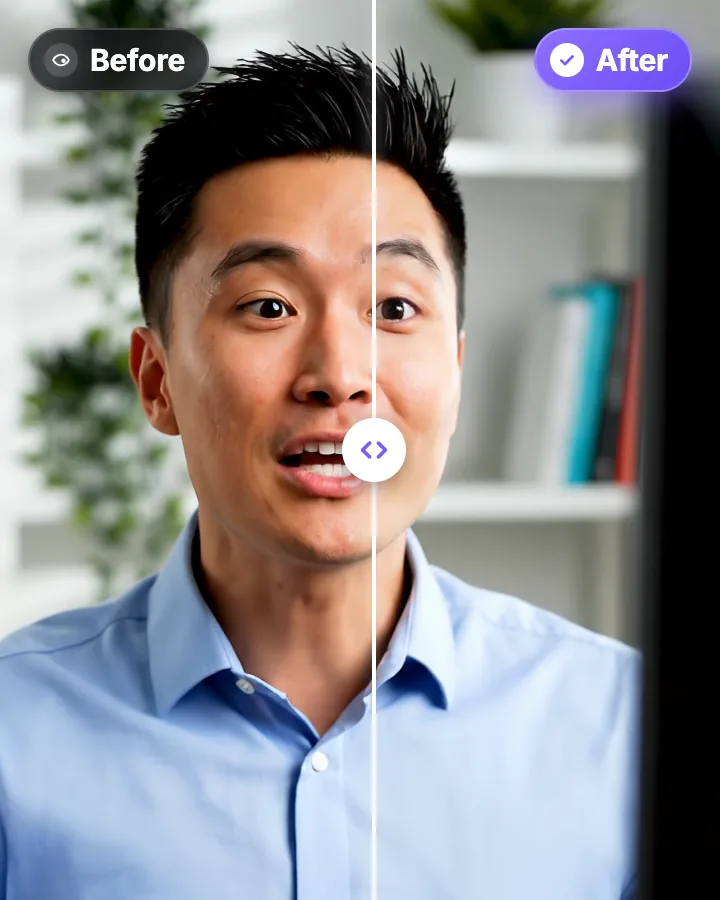
AI Eye Contact and Gaze Correction for Recorded Videos
Read a script, checked your notes or watched yourself on screen? Upload the video and the AI points your gaze back at the lens in every frame, keeping your resolution, frame rate and audio. Your first video is free.
Fix Eye Contact in Premiere Pro Footage, No Plugin Needed
Premiere Pro has no built-in eye contact correction. The workaround: correct the talking-head clip outside Premiere, then swap it back in. The corrected file keeps the same length, frame rate and audio, so your cuts stay where they are.
Edit YouTube Shorts, or Cut Them From Your Long Videos
Caption a Short you filmed, or paste the link to a long YouTube video and let AI clips pick up to 12 moments, reframed to 9:16 with captions. Clean audio, zoom and an AI cover are one click each on Pro.

AI video editor for creators who want viral content without the editing grind.
Features
All FeaturesAI CaptionsHormozi CaptionsMrBeast CaptionsAdd Subtitles to VideoSubtitle GeneratorAI Video EditorAI Clip GeneratorYouTube to ShortsEye Contact FixMagic ZoomTransitionsClean AudioAI MusicSound EffectsAI Auto EditRemove SilenceAI ThumbnailsBrand KitsCommunity StylesAI Video TranslatorFree Tools
Video Hook GeneratorTikTok CaptionsInstagram CaptionsYouTube TitlesTikTok HashtagsVideo Script GeneratorAI Video IdeasContent CalendarTikTok TranscriptVideo to TextFree SRT GeneratorSubtitle TranslatorFree TeleprompterWords to MinutesSRT to VTT ConverterTikTok Safe ZoneFree Sound EffectsAll 40 Tools →Use Cases
TikTok CreatorsYouTube ShortsInstagram ReelsPodcastersClippersAgencies & TeamsLinkedIn VideosTeleprompter Eye ContactPremiere Pro Eye ContactDaVinci Resolve Eye ContactFinal Cut Pro Eye ContactLoom Eye Contact