The TikTok Video Editor That Does Your Captions for You
A TikTok video editor that runs in your browser. Upload a talking video and word-by-word captions start on their own. Pick one of 26 styles, add zoom, sound effects and music in one click each (Pro), and download a 9:16 MP4 ready for TikTok.
- Included in the free plan
- No credit card required
StoryCut as a TikTok video editor: key facts
- What it is
- A browser-based TikTok video editor built around automatic captions, for creators who post talking videos. It finishes a take (captions and effects); it isn’t a timeline editor for cutting many clips together.
- What it does
- Generates animated, word-by-word captions as soon as your upload finishes. Zoom, sound effects and music are then one click each. You download a 9:16 MP4 and post it to TikTok yourself.
- Caption styles
- 26 built-in styles, including 6 Hormozi-style presets and a MrBeast-style preset, plus 60+ animations to build your own. Save as many custom styles as you like.
- Price
- Free: 3 videos at a time, up to 4 min each, 720p with a “Made with StoryCut” watermark. Starter: $7/mo billed yearly, 1080p, no watermark. Pro: $14/mo billed yearly, adds zoom, sound effects, music and clean audio.
- Works on
- Any modern browser, on a computer or a phone. No app to install.
- Not included
- No direct posting or scheduling to TikTok, and no batch editing.
Post more often without spending an hour on each edit
On a talking video, captions are often the slowest part of the edit. StoryCut starts transcribing the moment your upload finishes and lays out animated captions in the style you pick, word by word. From there, each extra effect is one click on Pro: zoom on key lines, sound effects on key words, AI music under your voice. Fix what you want, export, and post.
What TikTok creators use StoryCut for
Captions that start on their own
Word-level captions in 49 languages, generated right after upload. Pick a Hormozi, MrBeast or cleaner style, change the font, colors and highlighted words, and fix any word.
Magic zoom (Pro)
The AI reads your transcript and zooms in on key lines. Change each zoom’s intensity (5–50%), length and style, or remove it.
Auto sound effects (Pro)
The AI picks 4 to 8 key words in your script and places a matching sound effect on each one. Preview them and turn off any you don’t want.
9:16 export
Pick 9:16 and set the frame position for landscape footage. Export in 720p on Free, 1080p on Starter, 2K on Pro or 4K 60fps on Business.
TikTok
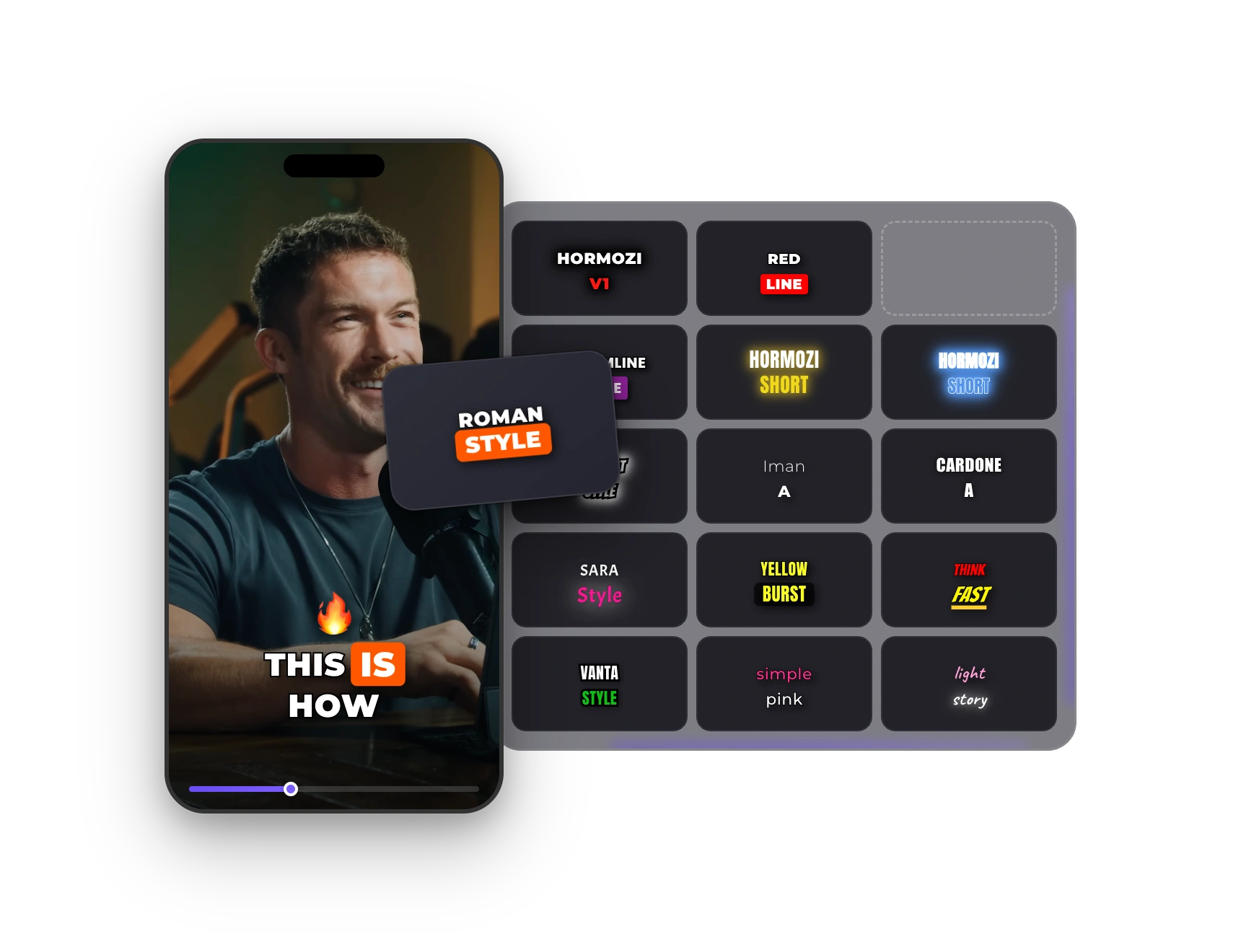
Caption Styles Made for Short-Form
Pick a style and every caption updates: font, colors, highlighted keywords, emojis and animation. Change the words per line or the position, then save it as your own style for the next video.
How It Works
Your TikTok Workflow in StoryCut
- 01
Upload your clip
Upload from your phone or computer (MP4, MOV or WebM). Captions start generating as soon as the upload finishes.
- 02
Style it
Pick a caption style, fix any word, and add zoom, sound effects or music in one click each (Pro).
- 03
Download and post
Export a 9:16 MP4 and upload it from the TikTok app or website. StoryCut doesn’t post for you.
Comparing TikTok editors?



FAQ
Frequently Asked Questions
Caption Your Next TikTok
Upload your video. Get back a scroll-stopper with viral captions, cinematic transitions, auto zoom, and clean audio. The same tools top creators use to explode views.
Upload a video, pick a style, download a 9:16 MP4. Free plan, no credit card.
- Join 10,000+ creators
- No credit card required

You Might Also Like
How to Add Captions on TikTok
TikTok can caption your video for you, and for many posts that’s enough. When you want bold, animated subtitles that stay on the video wherever it’s posted, StoryCut’s TikTok subtitle generator burns them in. Here are the steps for both.

Hormozi Style Captions, Generated for You
Bold uppercase words, two or three at a time, the key word in color and a quick pop-in. Upload a video and StoryCut transcribes it and animates the captions in the Hormozi style.
Auto SFX: Add Sound Effects to Your Video Automatically
StoryCut reads your transcript, picks the 4 to 8 words that deserve a sound and places a matching whoosh, pop or ding on each one, timed to the word. No library to dig through, no timeline to drag.

AI video editor for creators who want viral content without the editing grind.
Features
All FeaturesAI CaptionsHormozi CaptionsMrBeast CaptionsAdd Subtitles to VideoSubtitle GeneratorAI Video EditorAI Clip GeneratorYouTube to ShortsChatGPT & Claude ConnectorVideo Clipping APIEye Contact FixMagic ZoomTransitionsClean AudioAI MusicSound EffectsAI Auto EditRemove SilenceAI ThumbnailsBrand KitsCommunity StylesAI Video TranslatorFree Tools
Video Hook GeneratorTikTok CaptionsInstagram CaptionsYouTube TitlesTikTok HashtagsVideo Script GeneratorAI Video IdeasContent CalendarTikTok TranscriptVideo to TextFree SRT GeneratorSubtitle TranslatorFree TeleprompterWords to MinutesSRT to VTT ConverterTikTok Safe ZoneFree Sound EffectsAll 40 Tools →Use Cases
TikTok CreatorsYouTube ShortsInstagram ReelsPodcastersClippersAgencies & TeamsLinkedIn VideosTeleprompter Eye ContactPremiere Pro Eye ContactDaVinci Resolve Eye ContactFinal Cut Pro Eye ContactLoom Eye Contact