Video Clipping API: Turn Long Videos Into Shorts From Your Code
Send a YouTube link. StoryCut finds the best moments, reframes them to 9:16 around the speaker, adds animated captions and scores each clip. Read the clips, export them as MP4 and get a webhook when each step is done.
- Included in Starter, Pro and Business
- No per-minute API fees
- Signed webhooks


The StoryCut API: key facts
- What it does
- Turns a YouTube video into up to 12 vertical clips, each with animated captions, a title and a virality score from 0 to 100, then exports any clip as an MP4.
- Input
- A public YouTube link, 2 to 150 minutes long (a longer video is used for its first 150 minutes). Clip length: short (15–30 s), medium (30–59 s) or long (60–89 s).
- Output
- JSON with each clip’s title, score, start and end, a preview link and an edit link. Exports are 9:16 MP4s up to 1080p without a watermark, with a download link valid 24 hours.
- Webhooks
- run.completed, run.failed, export.completed and export.failed, each signed with HMAC-SHA256. Up to 5 endpoints per account.
- Price
- Included in Starter ($7/mo billed yearly), Pro and Business. A run uses one of the plan’s monthly AI Clips videos: 10, 50 or 100. No per-minute fees.
- Limits
- 120 requests a minute per API key. A run takes about 10 to 15 minutes.
What the StoryCut API does
The API runs the same AI Clips engine as the StoryCut website. You send a YouTube link; the AI reads the transcript, picks the moments with a strong opening and a complete thought, reframes each one to vertical around faces and the active speaker, adds animated captions and gives it a virality score. Your code reads the clips, best first, and exports the ones it wants.
Everything lands on your StoryCut account. Every clip also has an edit link: open it in the StoryCut editor to change the caption style or add zooms, music or sound effects, and the next export through the API uses those edits.
For developers
From a YouTube link to an MP4 in three calls
Send your API key as a Bearer token. Every answer is JSON; errors come back as { "error": { "code", "message" } } with the HTTP status.
# 1. Start a run
curl https://app.storycut.com/v1/runs \
  -H "Authorization: Bearer $STORYCUT_KEY" \
  -H "Content-Type: application/json" \
  -d '{"youtube_url": "https://www.youtube.com/watch?v=VIDEO_ID", "clip_length": "short"}'

# 2. About 10-15 minutes later (or on the run.completed webhook): the clips, best first
curl https://app.storycut.com/v1/runs/RUN_ID/clips -H "Authorization: Bearer $STORYCUT_KEY"

# 3. Export a clip, then get its download link
curl -X POST https://app.storycut.com/v1/clips/CLIP_ID/export -H "Authorization: Bearer $STORYCUT_KEY"
curl https://app.storycut.com/v1/exports/EXPORT_ID -H "Authorization: Bearer $STORYCUT_KEY"
Base URL: https://app.storycut.com/v1. The full reference, your keys and your webhooks are in StoryCut under API & Integrations.
Endpoints
POST /v1/runs
Starts a run from a YouTube link, with the clip length you want. Answers at once with the run id.
GET /v1/runs/{id}
The run’s status (processing, completed or failed), its progress in % and the number of clips.
GET /v1/runs/{id}/clips
The clips, best first: title, score, start and end, preview link and edit link.
POST /v1/clips/{id}/export
Exports a clip with its captions and the edits saved on it. GET /v1/exports/{id} gives the download link.
Webhooks
StoryCut sends a signed POST to your server when a run or an export finishes or fails, so you don’t have to keep checking.
GET /v1/usage
Your plan and what it has left this month, so a script can stop before the limit.
Your code
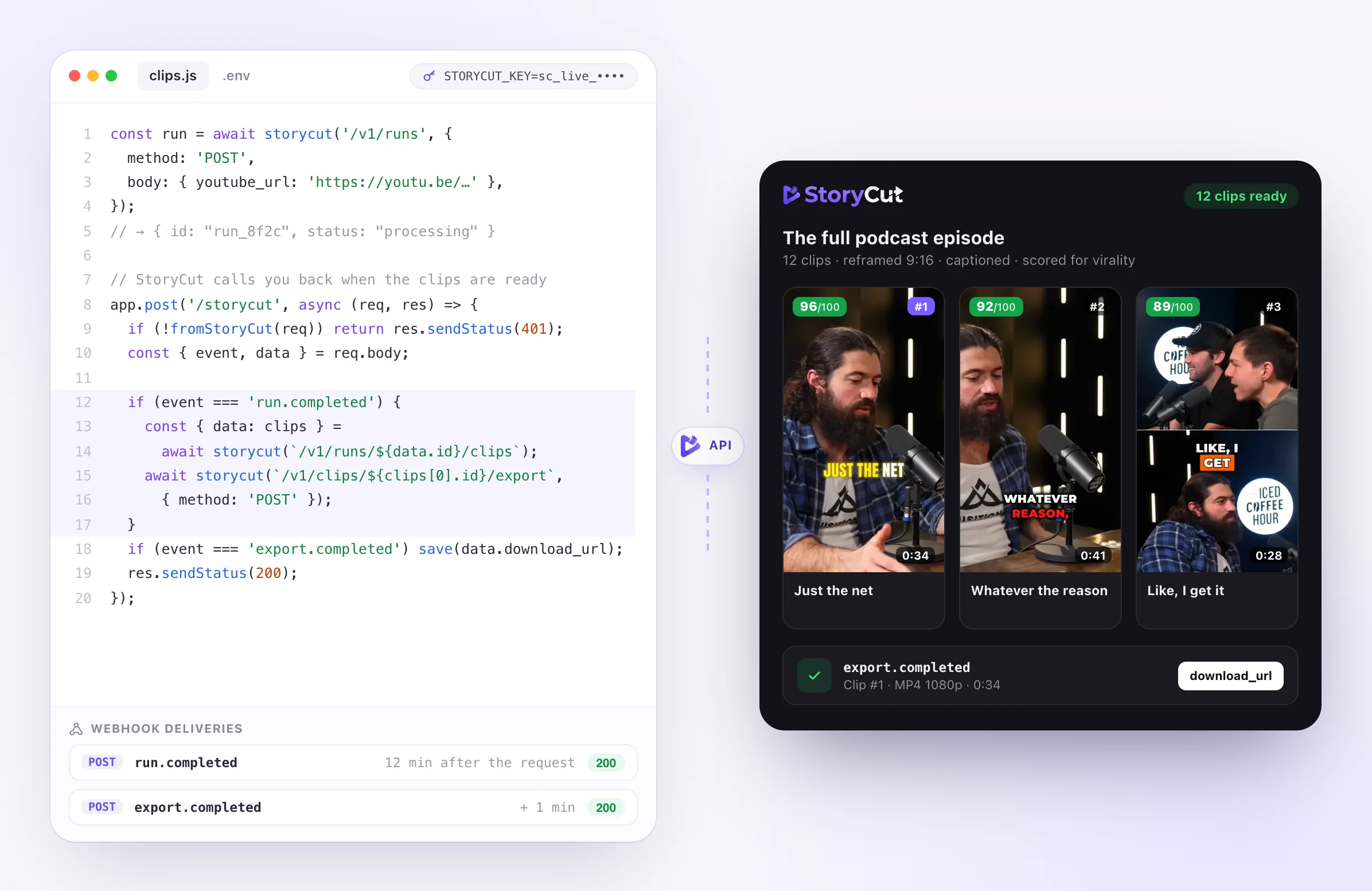
Your code starts it. A webhook tells you it’s done.
A run takes about 10 to 15 minutes, so you don’t have to wait on it. Add a webhook and StoryCut calls your server with run.completed when the clips are ready, then export.completed with the download link once a clip is rendered. Each request is signed with your webhook’s secret, so your server can check it came from StoryCut.
How It Works
How to start with the API
- 01
Create a key
On a Starter, Pro or Business plan, open API & Integrations in StoryCut and click Create key. It is shown once: keep it in your server’s environment.
- 02
Start a run
POST /v1/runs with a YouTube link. The answer comes back at once with the run id.
- 03
Get the clips
Wait for the run.completed webhook, or check GET /v1/runs/{id}. Then read the clips, best first.
- 04
Export
POST /v1/clips/{id}/export. The download link arrives with export.completed, or from GET /v1/exports/{id}.
What people automate with it
Podcast and webinar pipelines
A new episode goes up, your script sends the link, and the best clips are ready about 15 minutes later.
n8n and Make workflows
Call the API from an HTTP request step and start the next step from the webhook: no code to host.
Agencies
Run every client video through the same steps, and open a clip in the StoryCut editor when it needs a human touch.
AI assistants
Prefer to ask in a chat? The same runs start from Claude or ChatGPT with the StoryCut MCP connector, on every plan.
Video clipping APIs compared
| Feature |  StoryCut StoryCut |  OpusClip OpusClip |  Submagic Submagic | Vizard | Klap |
|---|---|---|---|---|---|
| API included from | Starter: $9/mo ($7/mo billed yearly) | Pro: $29/mo ($14.50/mo billed yearly) | Starter: $19/mo ($12/mo billed yearly) | Creator: $29/mo ($14.50/mo billed yearly) | Pay per use: $0.32 per short, $0.44 per video, $0.48 per export |
| How API use is counted | Runs: the plan’s 10, 50 or 100 long videos a month, any length up to 150 min | Credits, 1 per minute, 10 minimum per project; up to 15 hours a month on Pro | 10 to 100 API minutes a month, then packs from $57 for 250 minutes | The plan’s upload minutes, 1 credit per minute (600 a month on Creator) | Per operation |
| Clips from a YouTube link | Yes | Yes | Yes | Yes | Yes |
| Webhooks | Yessigned with HMAC-SHA256 | Yessigned | Yes | Yesset in the workspace | Nothe docs show polling |
| Rate limit | 120 requests a minute | 30 requests a minute | Not stated | 3 a minute on Creator | Not stated |
| Claude & ChatGPT connector (MCP) | Yesevery plan | Yes | Yes | Not checked | Not checked |
Checked on October 21, 2026 from each product’s public pages. Sources: OpusClip pricing, OpusClip API overview, OpusClip API limits, Submagic pricing, Submagic Magic Clips API, Vizard pricing, Vizard API pricing, Klap API pricing, Klap API: generate shorts.
FAQ
Frequently Asked Questions
Automate your clips
Choose Starter, Pro or Business, create a key in API & Integrations and send your first YouTube link.
- Included in Starter, Pro and Business
- No per-minute API fees

You Might Also Like
 StoryCut
Make Short Clips From Claude or ChatGPT
StoryCut is a remote MCP server. Add it to your AI assistant once, paste a YouTube link in the chat, and an AI Clips run starts on your StoryCut account: the best moments found, reframed to 9:16, captioned and scored.

AI Clip Generator: Turn Long Videos Into Shorts
Paste a YouTube link or upload a video from 2 to 150 minutes. The AI reads the transcript, picks 3 to 12 moments, scores each one, reframes it to 9:16 around faces and the active speaker, and adds animated captions.
Turn YouTube Videos Into Shorts with AI
Paste a YouTube link or upload a long video. The AI picks the strongest moments, cuts 3 to 12 short clips, reframes them to 9:16 around the person speaking and adds captions, ready for Shorts, TikTok and Reels.

AI video editor for creators who want viral content without the editing grind.
Features
All FeaturesAI CaptionsHormozi CaptionsMrBeast CaptionsAdd Subtitles to VideoSubtitle GeneratorAI Video EditorAI Clip GeneratorYouTube to ShortsChatGPT & Claude ConnectorVideo Clipping APIEye Contact FixMagic ZoomTransitionsClean AudioAI MusicSound EffectsAI Auto EditRemove SilenceAI ThumbnailsBrand KitsCommunity StylesAI Video TranslatorFree Tools
Video Hook GeneratorTikTok CaptionsInstagram CaptionsYouTube TitlesTikTok HashtagsVideo Script GeneratorAI Video IdeasContent CalendarTikTok TranscriptVideo to TextFree SRT GeneratorSubtitle TranslatorFree TeleprompterWords to MinutesSRT to VTT ConverterTikTok Safe ZoneFree Sound EffectsAll 40 Tools →Use Cases
TikTok CreatorsYouTube ShortsInstagram ReelsPodcastersClippersAgencies & TeamsLinkedIn VideosTeleprompter Eye ContactPremiere Pro Eye ContactDaVinci Resolve Eye ContactFinal Cut Pro Eye ContactLoom Eye Contact