 VSKapwing
Kapwing Eye Contact: Credits, Real Cost per Minute and a Cheaper Option
Kapwing’s AI Eye Contact runs inside its browser editor, on Pro and Business, and spends credits by the minute. Here is how many minutes a plan covers, what that costs per minute, and when paying per video is cheaper. Checked on Kapwing’s pricing page and help center on October 9, 2026. StoryCut is our product.
- 1 free video
- Then 5 for $9, one-time
- No watermark
Kapwing eye contact: the short answer
- Which plan
- Pro or Business. Kapwing’s eye contact page says the tool requires a Pro account. Pro is $24 a month, or $16 a month billed yearly ($192 a year), per member.
- Credits
- Eye Contact costs 30 credits per minute of video, per Kapwing’s credits article (updated September 10, 2026). Pro includes 1,000 credits a month and Business 4,000. The free plan has 10 credits for the life of the account.
- Minutes a month
- About 33 minutes on Pro and 133 on Business, if the credits go to nothing else. Subtitles, dubbing and other AI tools draw on the same credits.
- Cost per minute
- About $0.48 to $0.72 a minute on Pro, and $0.38 to $0.48 on Business. StoryCut’s pack works out to about $0.18 a minute.
- Model
- Kapwing says its eye tracker is powered by Texel, a video API provider. StoryCut runs NVIDIA’s Maxine Eye Contact model.
Kapwing vs StoryCut for eye contact
| What you get | Kapwing | StoryCut |
|---|---|---|
| Cheapest way to get it | Pro: $24/mo, or $16/mo billed yearly | $9 one-time for 5 videos |
| Free option | NoPro required | Yes1 video up to 4 min, no watermark |
| How it’s counted | 30 credits per minute, from a monthly allowance shared with other tools | One credit per video, whatever its length |
| Minutes covered | About 33 a month (Pro) or 133 (Business) | 5 videos up to 10 min (pack), 10 a month up to 10 min (Pro), unlimited up to 30 min (Business) |
| Price per minute | About $0.48 to $0.72 (Pro) | About $0.18 (pack) |
| Subscription needed | Yes | Nopack credits never expire |
| Output | Applied in your Kapwing project, exported up to 4K | H.264 MP4, same resolution (up to 4K), frame rate and audio |
| Model | Texel (per Kapwing) | NVIDIA Maxine Eye Contact |
| Also on the plan | Full browser editor, subtitles, teleprompter recording, Smart Cut, Clean Audio | Captions editor; Pro adds sound effects, zooms, silence removal and clean audio |
Checked on October 9, 2026 from each product’s public pages. Sources: Kapwing pricing, Kapwing: how credits work, Kapwing: AI Eye Contact, StoryCut pricing.
What Kapwing’s eye contact really costs
Kapwing doesn’t sell eye contact on its own. It comes with Pro, at $24 a month or $16 a month billed yearly, and each minute you correct spends 30 of the plan’s 1,000 monthly credits. That is about 33 minutes a month: 33 one-minute clips, or three 10-minute videos, if you use your credits for nothing else.
Divide the plan price by those minutes and Kapwing Pro costs about $0.48 a minute billed yearly and $0.72 billed monthly. Business, at $50 or $64 a month for 4,000 credits, brings it to about $0.38 to $0.48. Kapwing charges at least 1 credit per use, even for less than a minute.
StoryCut counts videos, not minutes. The $9 pack corrects 5 videos of up to 10 minutes each: about $0.18 a minute if each one runs the full 10 minutes, or $1.80 a video whatever its length.
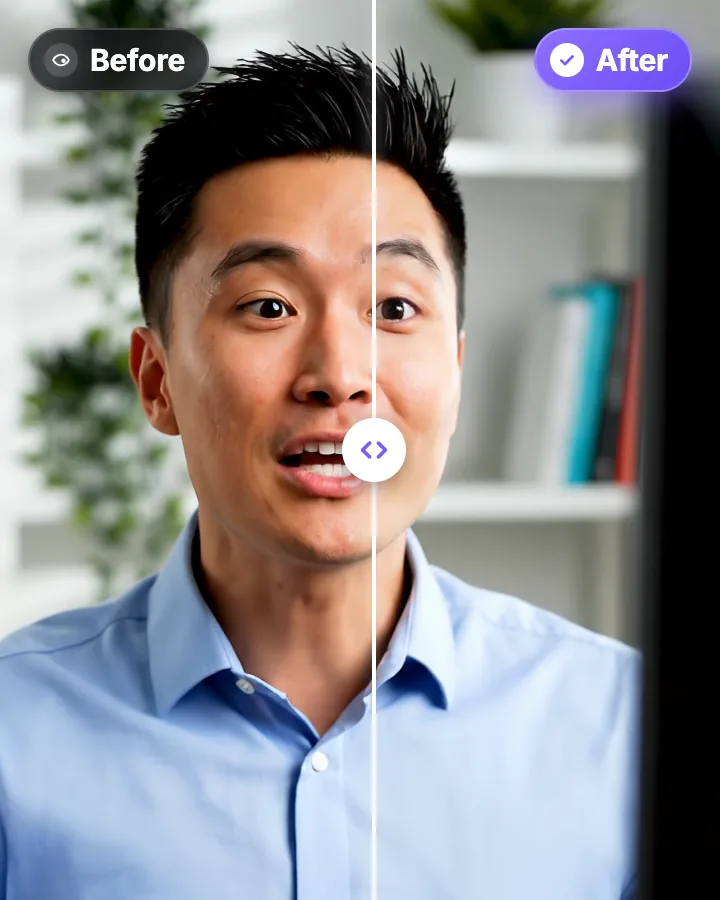
Before and after
The same take before and after correction in StoryCut. Only the eyes change: the framing, the blinks and the audio stay as recorded.
When Kapwing is the better choice
If you already edit in Kapwing, its eye contact stays in your project: record with Kapwing’s teleprompter, apply Eye Contact, add subtitles and export, with no round trip. If your team already shares a Kapwing workspace, adding eye contact there is simpler than adding another tool.
A separate tool is cheaper when eye contact is the main reason you would pay for Kapwing, or when you only have a few videos to fix. StoryCut charges once per video, with no monthly credits to use up.
More on Kapwing and eye contact
 Descript eye contact: price and limitsRead
 Captions eye contact on web and AndroidReadFix eye contact in Premiere Pro footageRead
 CapCut eye contact on PC, Mac and webReadFix eye contact in DaVinci Resolve footageReadFix eye contact in Final Cut Pro and iMovieReadDoes Canva have eye contact correction?ReadLoom eye contactReadBIGVU pricing and AI eye contactReadRiverside eye contact: what it can’t fixReadVEED eye contact: price and limitsRead
 Submagic pricing and AI eye contactReadElgato Prompter alternativeRead
FAQ
Frequently Asked Questions
Fix Eye Contact by the Video, Not the Minute
Upload your video. Get back a scroll-stopper with viral captions, cinematic transitions, auto zoom, and clean audio. The same tools top creators use to explode views.
Upload a recording and download it looking into the lens. 1 free video, then 5 for $9 one-time.
- Join 10,000+ creators
- No credit card required

You Might Also Like
AI Eye Contact and Gaze Correction for Recorded Videos
Read a script, checked your notes or watched yourself on screen? Upload the video and the AI points your gaze back at the lens in every frame, keeping your resolution, frame rate and audio. Your first video is free.
Kapwing Alternatives in 2026: Free Plans, Credits and Prices Compared
Kapwing is a solid team editor with 4K, 2-hour exports on Pro. If its credits run out, its 10-credit free plan is too small to test with, or its no-refund policy worries you, here is how seven alternatives compare. Prices checked on each tool’s website on October 3, 2026. StoryCut is our product.
Best AI Eye Contact Correction Software in 2026, Compared
Which tools fix eye contact in a video you already recorded, which only work on a live webcam, and what each one costs. Checked on each vendor’s own pages on October 8, 2026. StoryCut publishes this page and is one of the tools listed.

AI video editor for creators who want viral content without the editing grind.
Features
All FeaturesAI CaptionsHormozi CaptionsMrBeast CaptionsAdd Subtitles to VideoSubtitle GeneratorAI Video EditorAI Clip GeneratorYouTube to ShortsEye Contact FixMagic ZoomTransitionsClean AudioAI MusicSound EffectsAI Auto EditRemove SilenceAI ThumbnailsBrand KitsCommunity StylesAI Video TranslatorFree Tools
Video Hook GeneratorTikTok CaptionsInstagram CaptionsYouTube TitlesTikTok HashtagsVideo Script GeneratorAI Video IdeasContent CalendarTikTok TranscriptVideo to TextFree SRT GeneratorSubtitle TranslatorFree TeleprompterWords to MinutesSRT to VTT ConverterTikTok Safe ZoneFree Sound EffectsAll 40 Tools →Use Cases
TikTok CreatorsYouTube ShortsInstagram ReelsPodcastersClippersAgencies & TeamsLinkedIn VideosTeleprompter Eye ContactPremiere Pro Eye ContactDaVinci Resolve Eye ContactFinal Cut Pro Eye ContactLoom Eye Contact