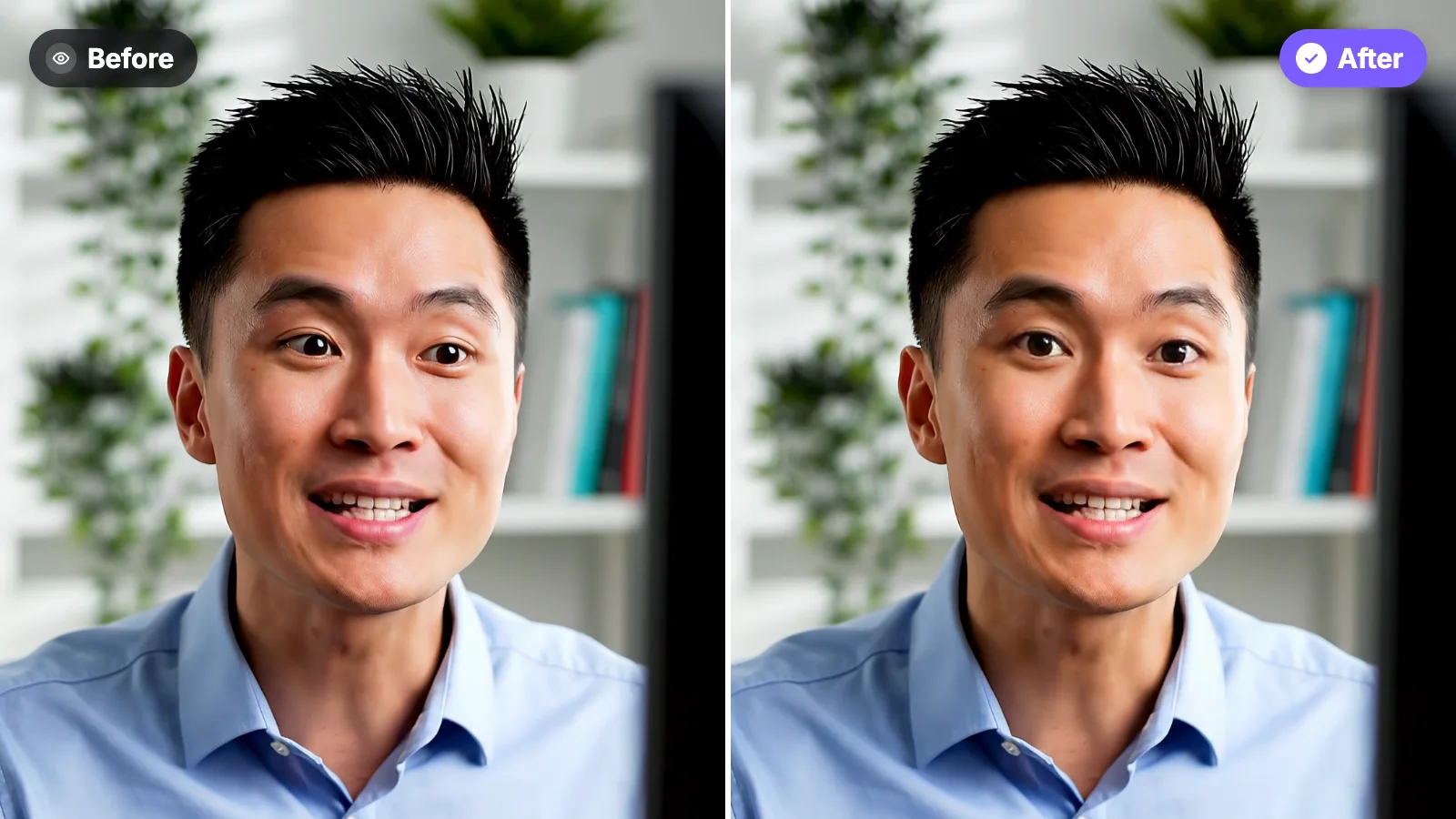
The Short Answer
If you already recorded the video, you don’t have to film it again. An AI eye contact correction tool moves your eyes back to the lens and leaves everything else as it was: your face, your voice and your words.
The 4 ways, from easiest to most work:
• Fix it in your browser. Upload the video to StoryCut from your phone or computer and watch the first 20 seconds fixed for free.
• Fix it while you record, for free. NVIDIA Broadcast does it live, if you have a Windows PC with an NVIDIA RTX graphics card.
• Use an editor you already pay for. Descript, Captions, CapCut and VEED have an eye contact effect.
• Avoid it next time. Put your script right under the camera and read it in short lines.
Disclosure: StoryCut publishes this guide and is one of the tools in it.
What Changes, and What Doesn’t
Only your eyes. Your head, your expressions, your voice and your words stay exactly as you recorded them, and the video keeps its quality and length.
The fix is strongest on the small look-aways that give away a script, like reading text beside the camera or glancing at notes. When you clearly look somewhere else on purpose, the AI eases off, so you don’t end up staring.
It works on clips too: make AI clips from a long video, then fix the eye contact on the clip you want to post. Editing in another app? Fix the video first, then bring it back into your project: see the guides for Premiere Pro, DaVinci Resolve and Final Cut Pro.
Way 2: Fix It While You Record, Free, With NVIDIA Broadcast
NVIDIA Broadcast is a free app for Windows PCs with an NVIDIA RTX graphics card, the kind found in gaming PCs. Turn on its Eye Contact effect and you look at the viewer while you record or stream.
The catch: it doesn’t run on a Mac or a phone, you need that PC at the moment you film, and it’s made for a live camera. Its new file mode (October 2026) can process some recorded videos, but NVIDIA doesn’t say whether Eye Contact works there. For a video you already have, a browser tool is simpler. More in NVIDIA Broadcast alternatives.
Which Eye Contact Tool Is Right for You?
The cheapest way each app offers eye contact, in US dollars. Scroll sideways on a phone.
Checked on each app’s own pages on October 24, 2026. Prices before tax; they can differ by country, app store and promotion.| Tool | Best for | Works on | Cheapest way to get it | Free? |
|---|
| StoryCut | A video you already recorded | Any browser: phone, Mac or PC | $3.99 per video, or $9 for 5 | Free 20 s preview |
|---|
| NVIDIA Broadcast | Recording or streaming live | Windows PC with an NVIDIA RTX card | Free | Yes |
|---|
| Descript | People who already edit in Descript | Mac and Windows apps, or Chrome | Hobbyist, $16/mo billed yearly ($24 monthly) | A limited try |
|---|
| Captions | Creators who edit on their phone | iPhone, Android and desktop apps | Basic, $9.99/mo (Lite $4.99 on Android) | No |
|---|
| CapCut | Quick edits on your phone | CapCut phone app | Free, according to CapCut | Yes |
|---|
| VEED | Editing in the browser | Browser | Creator plan and up | One try |
|---|
Sources: StoryCut eye contact · StoryCut pricing · NVIDIA Broadcast · NVIDIA Broadcast release notes · Descript: Eye Contact · Descript pricing · Captions plans · Captions feature availability · CapCut AI eye contact · VEED: eye contact correction · VEED pricing
Way 3: Use the Eye Contact Effect in Your Editor
If you already edit in one of these apps, the effect is a few taps away:
• Descript: select your video, open Effects and turn on Eye Contact. It’s on paid plans from Hobbyist; the free plan has a limited try.
• Captions: upload or record in the app, then choose Eye Contact. It’s on paid plans, in the phone and desktop apps, not on the web.
• CapCut: in the phone app, select your clip and tap Eye contact. CapCut says it’s free.
• VEED: in the browser editor, select your clip and turn on eye contact. It’s on the Creator plan and up, with one free try.
All four work on recorded video. What differs is the price and the device.
Way 4: Avoid the Problem Next Time
The best fix is the one you don’t need. Scroll your script with a free online teleprompter placed right under the camera, and use these habits:
When It Can Look Off
AI eye contact looks most natural with one face, turned roughly toward the camera, in good light. It can look less natural when you turn your head a lot, when your glasses reflect a bright screen, or in a dark room. That’s why it helps to watch the free preview on your own video before you pay: you see exactly how yours will look.