How to Turn Podcast Episodes Into Viral Reels & Sh...
Tutorials
10 min read
How to Turn Podcast Episodes Into Viral Reels & Shorts
The complete playbook for repurposing a single podcast episode into 10+ short-form video clips that drive listeners, subscribers, and revenue.
StoryCut Team
April 2, 2026
Why Does Every Podcaster Need Short-Form Video in 2026?
Every podcaster needs short-form video because it is the single most effective discovery channel for new listeners. 47% of podcast listeners discovered their current favorite show through a short clip on TikTok, Instagram Reels, or YouTube Shorts — up from 29% in 2024. The podcast market has exploded past 4.4 million active shows, making organic discovery through podcast directories nearly impossible.
Short-form video solves the discoverability problem by meeting potential listeners where they already spend their time. YouTube has reported more than 70 billion daily views on Shorts. Instagram Reels account for 30% of time spent on the platform. TikTok users spend an average of 95 minutes per day scrolling.
The math is simple: a 60-minute podcast episode can yield 10 to 15 high-quality clips, each one acting as a micro-advertisement for your show. Podcasters who consistently post clips see 25-40% growth in weekly downloads within three months. If you are serious about growing your podcast, short-form video is not optional — it is your primary growth lever.
What Results Can Podcasters Expect from Clip Repurposing?
25-40%
Increase in weekly episode downloads within 90 days of consistent clip posting
10-15
Average clips extracted per 60-minute podcast episode using a systematic approach
3.2x
Higher share rate for clips with emotional hooks in the first 2 seconds vs. slow intros
80%
Of short-form video viewers watch without sound, making captions essential for podcast clips
52%
Of new podcast listeners in 2026 credit a short clip as their discovery path
6x
More content touchpoints per episode when repurposing vs. publish-and-pray distribution
What Makes a Great Podcast Clip?
A great podcast clip delivers a single compelling idea with emotional resonance in under 90 seconds, starting with a hook that stops the scroll within the first two seconds. The best clips do not summarize episodes — they isolate moments that stand entirely on their own.
Think of each clip as a trailer, not a recap. The viewer should feel something — surprise, curiosity, laughter, disagreement, inspiration — within the first five seconds. Data from Opus.pro and Headliner shows that clips with a strong emotional trigger in the opening line get 3.2x more shares than those that start with context-setting.
Great podcast clips share four qualities. First, they have a clear hook — a bold statement, a surprising fact, or a provocative question. You can study proven patterns with a viral hook generator to understand what works. Second, they are self-contained and require zero context from the full episode. Third, they feature dynamic energy — a shift in tone, a laugh, a debate moment. Fourth, they end with either a resolution or deliberate curiosity gap that makes the viewer want more.
The most common mistake podcasters make is choosing clips based on what they think was important rather than what will perform on a feed. Important and shareable are often very different things.
What Are the 6 Types of Podcast Clips That Go Viral?
The Hot Take
A bold, contrarian opinion that makes viewers stop and react. These clips thrive on disagreement — comments like "finally someone said it" or "this is so wrong" both fuel the algorithm. Best kept under 45 seconds.
The Aha Moment
A framework, mental model, or insight that reframes how the viewer thinks about a topic. Educational clips get saved and shared at 2.4x the rate of entertainment clips, making them powerful for long-term growth.
The Funny Moment
Genuine laughter and unexpected humor are algorithm gold. Clips with audible laughter in the first three seconds see 58% higher completion rates. Do not force it — mine your episodes for naturally funny exchanges.
The Story Hook
A personal anecdote or guest story that opens with a line like "So I was sitting in the hospital when..." Narrative clips create irresistible curiosity loops. Cut them right before the resolution to drive traffic to the full episode.
The Tactical Tip
A specific, actionable piece of advice the viewer can use immediately. "Here are 3 things I do every morning..." format works exceptionally well. Pair with on-screen text to reinforce each step visually.
The Debate Clip
Two hosts or a host and guest with opposing views creating natural tension. Debate clips generate 3-5x more comments than monologue clips because viewers feel compelled to pick a side. The algorithm rewards comment velocity heavily.
How Long Should Podcast Clips Be for Each Platform?
The ideal podcast clip length is 30 to 60 seconds for TikTok, 45 to 90 seconds for Instagram Reels, and 30 to 58 seconds for YouTube Shorts. Each platform has a different sweet spot driven by its algorithm's completion rate weighting.
TikTok's algorithm heavily favors watch-through rate, so shorter clips that viewers watch multiple times outperform longer ones. The platform supports up to 10 minutes, but podcast clips between 30 and 60 seconds consistently achieve the highest share rates. For crafting titles that drive clicks, try a TikTok caption generator to nail the copy.
Instagram Reels gives a slight boost to content between 45 and 90 seconds, as Meta has publicly stated it wants to reward "substantive" short-form content. This makes Reels the best platform for slightly longer, more in-depth podcast clips.
YouTube Shorts caps at 60 seconds (expanded from the original 58-second limit). Shorts that run 30 to 50 seconds perform best for podcast content because YouTube's algorithm weighs both completion rate and engagement actions like subscribing. A strong YouTube Shorts title can significantly boost click-through from the Shorts shelf.
The key principle across all platforms: never let the clip length exceed the idea length. If your point lands in 25 seconds, do not pad it to 60.
How Do You Find the Best Moments in Your Podcast?
Finding the best clip-worthy moments requires a systematic approach: review your transcript for emotional peaks, knowledge drops, and natural hooks rather than scrubbing through audio manually. The most efficient method combines AI transcription with human editorial judgment.
Start by generating a full transcript of your episode. Look for five specific signals. Energy shifts — moments where the speaker's pace, volume, or intensity noticeably changes. Laughter — any point where host or guest laughs genuinely. Standalone quotes — sentences that make complete sense pulled out of context. List structures — any time someone says "there are three things" or "my framework is." Disagreement — moments where someone pushes back or challenges an assumption.
Mark timestamps for each of these signals, then review them in the original audio. You are listening for clean in-and-out points — moments where you can cut without the viewer feeling like they missed something. The best clips start mid-energy, not with a slow buildup.
A practical workflow is to batch this process. Record on Monday, get your transcript Tuesday, identify 12 to 15 potential moments Wednesday, then trim and format Thursday. Use a content calendar generator to map your clips to a consistent posting schedule across all platforms. This assembly-line approach takes roughly 90 minutes per episode once you have a system — far less time than most podcasters spend because they skip the transcript step and try to find moments by scrubbing audio.
How StoryCut Transforms Your Podcast Workflow
StoryCut is purpose-built for podcast creators who need to produce high volumes of clips without a video editing background. The workflow is designed around speed: import your podcast recording, and the platform handles the technical complexity so you can focus on choosing the right moments.
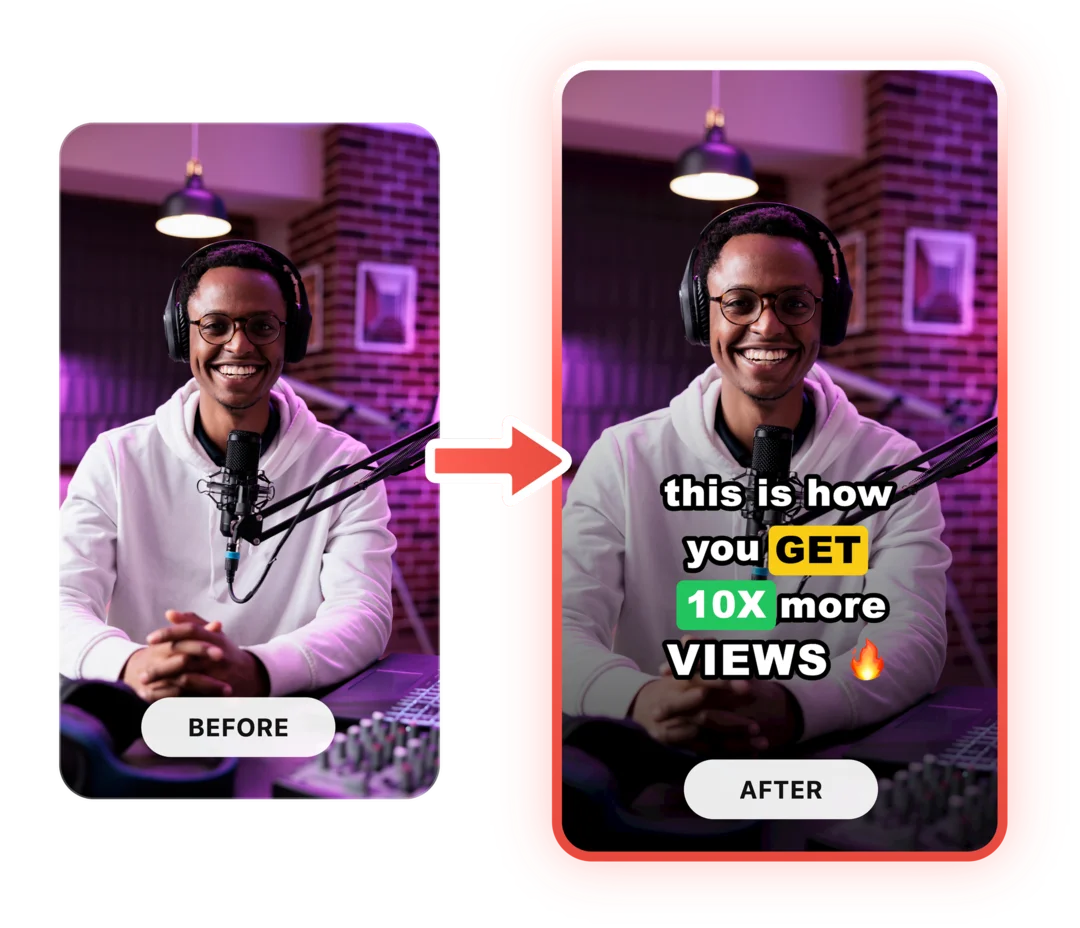
AI-powered captions are generated automatically with word-level accuracy and animated timing, eliminating the hours most creators spend manually syncing subtitles. Since 85% of social media video is watched without sound, captions are not a nice-to-have — they are essential for podcast clips.
The clean audio feature removes background noise, mouth clicks, and room echo that plague home-studio recordings, ensuring your clips sound professional regardless of your recording setup. Pair it with sound effects to add subtle audio cues — whooshes on transitions, emphasis hits on key points — that increase perceived production value.
For video podcasts, magic zoom automatically adds dynamic camera movements to static talking-head footage, creating the Ken Burns-style motion that keeps viewers engaged. The result: clips that look like they were produced by a dedicated video editor, created in minutes instead of hours.
How Do You Format Podcast Clips for Maximum Engagement?
Format podcast clips in 9:16 vertical aspect ratio with bold animated captions, a progress bar, and your podcast branding — these three elements alone can double your average view duration compared to raw horizontal footage reposted without optimization.
The visual hierarchy of a high-performing podcast clip follows a consistent pattern. The top 15% of the frame holds your podcast name or logo as a subtle watermark. The center 50% features the speaker's face — this is critical because human faces increase engagement by 38%. The bottom 35% is reserved for captions, which should use a large, bold sans-serif font with a contrasting background or text shadow for readability.
For audio-only podcasts without video footage, you have several proven visual approaches. The audiogram style — waveform animation over a branded background — has fallen out of favor. In 2026, the highest-performing audio podcast clips use either a static image of the host with animated captions and subtle zoom movements, or AI-generated b-roll that matches the topic being discussed.
Always include a progress bar at the top or bottom of the clip. Clips with visible progress bars see 12-18% higher completion rates because viewers can gauge how much content remains and are more likely to watch through if they see they are already halfway. When titling your clips, a podcast clip title generator can help you craft scroll-stopping text overlays.
How Do You Add Captions to Podcast Clips and Why Is It Non-Negotiable?
Adding captions to podcast clips is non-negotiable because 80% of short-form video viewers watch without sound, and captioned videos receive 40% more engagement. For podcast content specifically — which is inherently audio-first — captions are the bridge between your spoken words and the silent-scrolling viewer.
The fastest method is using AI-powered caption generation that produces word-level timestamps with animated highlighting. Manual captioning takes 6 to 10 minutes per clip. AI captioning takes under 30 seconds with higher accuracy.
Caption style matters more than most creators realize. The current best-performing format uses 2 to 4 words displayed at a time with a highlight or color change on the active word. This karaoke-style animation holds attention because the viewer's eye is constantly tracking movement. Full-sentence captions that appear as static blocks perform significantly worse — they let the viewer read ahead and disengage.
Font choice affects readability and brand perception. Bold, rounded sans-serif fonts at 80 to 100pt equivalent size work best on mobile screens. Always add a text shadow, outline, or semi-transparent background box to ensure readability over any video content. Avoid thin fonts, script fonts, or anything below 60pt — these become illegible on a phone screen, which is where 94% of short-form video is consumed.
Color is your final lever. White text with a black outline is the safest default, but branded highlight colors on the active word create recognition over time. Consistency in your caption style across all clips builds visual brand identity that viewers begin to associate with your podcast.
How Do You Turn a Podcast Episode into 10+ Clips in 5 Steps?
Transcribe and Timestamp Your Episode
Upload your episode to get a full transcript with word-level timestamps. Read through the transcript once, highlighting every moment that matches the six viral clip types — hot takes, aha moments, funny exchanges, story hooks, tactical tips, and debates. Mark at least 12 to 15 potential moments. This takes 20 to 30 minutes and is the highest-leverage step in the entire process.
Select and Trim Your Top 10 Moments
Review your highlighted moments in the original audio. For each one, find the clean entry point — the exact word where the clip should start — and the natural exit point. Trim each clip to fit platform-optimal lengths: 30 to 60 seconds for TikTok, 45 to 90 seconds for Reels, 30 to 58 seconds for Shorts. Discard any moments that require too much context setup. You should end up with 10 to 12 strong clips from a 60-minute episode.
Add Captions, Branding, and Visual Polish
Apply AI captions to every clip — this single step will have the biggest impact on performance. Add your podcast logo or name as a subtle watermark. Use clean audio processing to remove background noise and mouth clicks. For video podcasts, add dynamic zoom effects to keep static talking-head footage visually interesting. Each clip should take under 2 minutes to polish with the right tools.
Write Hooks, Titles, and Descriptions
Every clip needs a text hook overlay for the first frame, a platform-specific title, and a description with relevant hashtags. The text hook should be the most provocative or curiosity-inducing line from the clip — not a summary. Use a hook generator to test different angles. Write your description to include a call-to-action driving listeners to the full episode, with a link in your bio.
Schedule and Cross-Post Strategically
Do not post all 10 clips on the same day. Map them to a content calendar that distributes clips across 5 to 7 days between episodes. Post your strongest clip on release day to drive immediate listens. Stagger the remaining clips with your best-performing ones mid-week when platform traffic peaks. Cross-post to all three platforms but adjust aspect ratios and captions for each. Repurpose your top-performing clips as audiograms, quote graphics, or carousel posts for additional touchpoints.
Frequently Asked Questions
Yes, audio-only podcasts can be turned into highly effective video clips. The most common approach is combining a static photo or branded background with animated captions and subtle motion effects like zoom and pan. Clips from audio-only podcasts regularly outperform traditional video podcasts because the animated captions become the visual focal point, which is highly engaging on mobile. StoryCut handles this workflow natively — upload your audio, and the platform generates visual clips with animated captions automatically.
Aim for 10 to 15 clips per 60-minute episode, though the actual number depends on content density. A guest interview with rapid-fire insights might yield 15 or more strong moments. A deep-dive solo episode might produce 8 to 10. Quality always beats quantity — it is better to post 8 excellent clips than 15 mediocre ones. Start by identifying every potential moment, then ruthlessly cut any clip that requires external context to make sense.
Cross-posting the same clip across all three platforms is an effective starting strategy, but optimizing for each platform yields better results over time. TikTok favors faster pacing and trending audio. Reels rewards slightly longer, more polished content. Shorts benefits from strong titles since they appear in search results. At minimum, adjust your captions, descriptions, and hashtags for each platform even if the video itself is identical.
The highest-performing caption style in 2026 is word-by-word animated highlighting with 2 to 4 words displayed at a time. Use a bold sans-serif font at 80 to 100pt, white text with a black outline or shadow, and a branded color for the active word highlight. Avoid full-sentence static captions, thin fonts, or anything that requires squinting on a mobile screen. The karaoke-style word animation keeps viewers engaged by giving their eyes constant movement to track.
The most effective bridge from clip to full episode is a curiosity gap — end your clip at a moment of tension or right before a revelation, then add a text overlay saying "Full episode — link in bio." Include your podcast name in every clip as a branded watermark so viewers can search for it directly. In your caption, mention the episode number and a teaser of what else the episode covers. Track which clips drive the most listens using UTM parameters in your bio link to refine your clipping strategy over time. Having a memorable podcast name makes this search-and-find behavior much easier.
Every Episode Deserves to Go Viral
Upload your podcast clip. Get back a scroll-stopper with AI captions, clean audio, dynamic zoom, and cinematic effects. One recording becomes a week of content. Your first video is free.